
To track brand mentions in ChatGPT, Gemini, Perplexity and Claude, write 10–20 questions the way your customers ask them. Run each one several times in a clean session. For every run, log whether you are named, in what position, next to which competitors and from which sources. Then repeat the same set on the same schedule every month, and follow the trend rather than any single answer.
This month is a good time to set a baseline. Google began rolling out its November 2026 core update and shipped a Search upgrade built on Gemini 4 Hydrogen. In the same week, Seer Interactive published a detailed re-measurement of its own ChatGPT mentions, and its method is worth copying. Below we turn that kind of method into a routine you can run without special tools.
Why a single ChatGPT check tells you almost nothing
ChatGPT, Gemini, Perplexity and Claude write each answer from scratch. Ask the same question twice and you can get a different list of names, in a different order, from different sources. If you type one question once and see your brand (or don't), you have one sample, not a measurement.
Seer Interactive's numbers show how large the spread can be. In February 2025, Wil Reynolds asked ChatGPT three prompts once each. ChatGPT named 21 agencies and never named Seer. In November 2026, Seer ran the same three prompts 10 times each on three current ChatGPT models with web search on: 90 runs in total. Seer was named in 58 of them, about 64% (the headline rounds this to 65%).
The per-question figures matter more than the total. Seer appeared in 25 of 30 answers on a "PPC and SEO agency" prompt and in 28 of 30 on a "data-driven SEO companies" prompt, but in only 5 of 30 on an "innovative SEO agency" prompt. Same brand, same week: anywhere from almost always to rarely, depending on how the question was worded.
Seer also lists the limits of its own comparison. The 2025 baseline was a single run in logged-in ChatGPT on GPT-4o. The 2026 runs went through an API with no memory or personalization, on newer models. And the change cannot be tied line by line to specific actions. The lesson for you: fix your setup on day one and run every question more than once.
How to track brand mentions in ChatGPT: a five-step routine
The routine has five steps. You need a spreadsheet, the free or paid versions of the four assistants, and a fixed time slot each month.
- Write 10–20 test questions the way customers ask them.
- Run each question several times in a clean session in each assistant.
- Log every run in one table.
- Turn the log into a Share of Model figure.
- Repeat on a fixed monthly schedule and note outside events.
Step 1. Write 10–20 questions the way customers ask them
Your test questions should sound like real buyers, not like your marketing copy. Take the wording from sales calls, support emails, reviews and the queries in Google Search Console. Cover five types:
| Question type | What it tests | Pattern |
|---|---|---|
| Category | Whether you are part of the default answer for your field | "What is a good [category] for [use case]?" |
| Local | Whether you show up for your area | "Best [service] in [city]" |
| Comparison | How you are described next to a rival | "[You] vs [competitor]: which is better for [need]?" |
| Alternatives | Whether you are offered as a switch option | "Alternatives to [competitor]" |
| Problem-led | Whether you come up when the buyer names a need, not a category | "How do I [solve problem] without [pain]?" |
For example, imagine a family law firm in Denver. Its set might include "best divorce lawyer in Denver", "family law firm in Denver for shared custody cases", "[Firm] vs [competitor firm]", "alternatives to [competitor firm]" and "how do I start a divorce in Colorado if my spouse lives in another state". Most questions should not contain your brand name, because they test whether the assistant finds you on its own. Add two or three branded questions ("What does [Firm] charge for a consultation?") in a separate group. Those test whether the facts are right, not whether you are found.
Give each question an ID (Q01, Q02…) and never edit the wording afterwards. If you need a new question, add it under a new ID and start its history from scratch.
Step 2. Run each question several times in a clean session
Your own chat history, memory and location can change what an assistant tells you. A clean, repeatable setup makes this month's numbers comparable with next month's.
- Use a clean session. Log out, or use a temporary or incognito chat with memory and personalization turned off, where the assistant offers that option.
- Start a new chat for every run. Paste the exact wording. No follow-up questions, no "what about us?"
- Keep web search on where you can, and note whether it was used. Seer ran its tests with web search on, so its numbers reflect answers that could draw on current web pages.
- Run each question 3–5 times per assistant. Seer used 10 runs per prompt per model. More runs give a steadier figure, so if a question really matters, go higher.
- Record the model, date and location. Write down the model name if the interface shows it, plus the country you tested from. Local answers depend on location, so do not switch VPNs between months.
Pick one route and stay with it: either the consumer apps or an API. An API is the developer interface that sends questions to the model directly, without the app's memory or account settings. Seer's caveat shows that answers from logged-in apps and from APIs may not match, so mixing the two blurs your trend.
Step 3. Log every run in one table
Use one row per run. This template covers what you need for both the figures and the gap analysis later:
| Column | What to write | Example entry |
|---|---|---|
| Date | Day of the run | [YYYY-MM-DD] |
| Assistant and model | Product and model name if shown | ChatGPT, [model] |
| Question ID | From your fixed list | Q04 |
| Run # | 1, 2, 3… | 2 |
| Named? | Yes / No | Yes |
| Position | Place in the list, or "only mention" | [3rd of 6] |
| Competitors named | Every other brand in the answer | [Competitor A], [Competitor B] |
| Sources cited | URLs the assistant linked | [listicle URL], [your homepage] |
| Does the source mention you? | Yes / No / Not checked | No |
| Sponsored or organic | Mark any ad placement | Organic |
| Facts correct? | Prices, location, services, hours | Wrong opening hours |
Two columns need extra care. Sources cited: when an assistant shows sources, copy the URLs. They are the main clue when you later look for gaps. Sponsored or organic: ChatGPT now runs ads, and OpenAI's latest ChatGPT Ads update added intelligent bidding and new cost targets in Ads Manager. Never count a paid placement as an organic mention.
Step 4. Turn the log into a Share of Model figure
Share of Model is the share of AI answers that name your brand: the AI version of share of voice. We explain the framework in our research on measuring Share of Model and AI visibility. For a monthly routine, these figures are enough:
- Mention rate = runs that name you ÷ total runs × 100.
- Mention rate per assistant: the same formula for ChatGPT, Gemini, Perplexity and Claude separately.
- Mention rate per question type: category, local, comparison, alternatives, problem-led.
- Competitor share: the same formula for each competitor in the log.
- Average position, counted only for runs where you are named.
Seer's published numbers make a worked example. Seer: 58 ÷ 90 = 64%. Its competitor iPullRank appeared in 50 of the 90 answers, about 56%. On the "innovative SEO agency" prompt, though, iPullRank was named in 23 of 30 runs and Seer in 5 of 30. A total alone would hide that gap.
Seer also sorts brands into reliability bands, and you can reuse them. Reliable means named in at least 2 of 3 answers. Rarely means named in fewer than 1 in 3. Sometimes is everything in between. Of the 21 agencies ChatGPT named in February 2025, Seer found that none showed up reliably in November 2026: 4 showed up sometimes, 8 rarely and 9 not at all.
Step 5. Repeat on a fixed monthly schedule
- Run the full set in the same week each month, with the same setup.
- Write down any outside events in a "context" column next to the month.
- Compare mention rates per assistant and per question type with the previous month.
- Pick one or two gaps to work on (see the next section), and log the date of every change you make to your site or listings.
- Re-run next month and check whether the targeted questions moved.
For November 2026, the context column already has several entries. Search Engine Roundtable reported ranking volatility on 8 and 9 November and the start of the core update rollout. Google released the Gemini 4 Hydrogen upgrade to Search days after Gemini 4 Carbon came out. Google also confirmed a logging bug in the Search Console Generative AI performance report for 9–11 November that lowered reported impressions. If you compare Google-side data, mark those dates as unreliable. Note ChatGPT model changes too: the models Seer tested in 2026 were different from the one it used in 2025.
How to read the gaps in your log
The figures tell you where you stand. The sources and competitor columns tell you why.
You are not named at all
Open the sources the assistants cited for that question and check whether they mention you. Seer's analysis shows what to look for. In the 58 answers that named Seer, ChatGPT cited Seer's own site in 21 (its homepage and /work pages). The four other most-cited pages were "best agencies" listicles on agency sites that rank their publisher first. Two of them listed Seer, at #4 and #3, and all four had been updated in the last few months. If the pages behind an answer never mention you, the assistant has little to work with.
Competitors are named from listicles or directories
Make a list of every third-party page that names competitors but not you: review sites, industry directories, "best of" articles, comparison pages. That is your outreach and listing list. Ask to be considered, fix outdated profiles and keep everything accurate. Do not try to manufacture mentions.
You are named, but the facts are wrong
Wrong prices, old addresses or discontinued services point back to your own site and your listings. Find which cited page carries the old fact. Then make sure your current facts sit on one clear, easy-to-read page.
Can AI bots read your site?
If your own pages never appear among the sources, check access before anything else. Look in robots.txt, CDN bot settings and firewall rules for blocks on crawlers such as OAI-SearchBot (ChatGPT search), ClaudeBot (Anthropic) and PerplexityBot. Our map of llms.txt and other AI-crawler signals in 2026 explains how robots.txt rules fit with the other signals. Server logs show whether those bots actually arrive and which errors they hit. Pulse shows the same in a dashboard: which AI bots visit, what they read and where they stumble.
What changes the numbers: bot access, facts pages and third-party listings
Measuring and fixing are separate jobs. For the wider picture, see our research on how visibility rules change from SEO to GEO. GEO (generative engine optimization) is the work of making your business easy for AI assistants to find, understand and cite. Here are the levers that most often explain a gap in your log:
| Lever | What to check | Where to look |
|---|---|---|
| Bot access | AI search crawlers are allowed and not blocked by CDN or firewall rules | robots.txt, CDN settings, server logs |
| Errors on key pages | Bots get 200 responses on service, pricing and contact pages, not 403 or 5xx | Server logs, bot reports |
| Facts page | Prices, hours, contacts and services are current and in one place | Your site, an AI Page, llms.txt |
| Your own key pages | Homepage and case or service pages clearly say what you do and for whom | The pages assistants cite for you |
| Third-party listings | You appear in the listicles, directories and review sites the assistants cite | The "sources cited" column of your log |
For the facts page, Chetver's AI Page is one option. Chetver builds a page with your prices, hours, contacts and services from your website, you publish it on aipage.yoursite.com, and it comes with an llms.txt file. Our research on GEO, AIEO and why a business needs an AI Page explains the idea in more detail. Whatever you change, log the date so that next month's numbers can be read against it.
A real before/after measurement: Sereda.ai
The Sereda.ai case shows a fixed method with clear dates. Sereda.ai is a Ukrainian HR platform. Before it had an AI Page, ChatGPT said it did not know the product, and it barely appeared in lists of HR tools. The AI Page was published on 22 October 2025.
- Questions: 4.
- Scoring: 5 criteria × 10 points, scaled to 100 and averaged over the 4 questions. Two researchers scored the answers independently.
- "Before": September to early October 2025. "After": early December 2025.
- Result: ChatGPT 24 → 87, Gemini 28 → 91.
The case scores each answer on five criteria instead of counting mentions, so it is a different metric from Share of Model. The structure is still what your routine needs: fixed questions, a fixed scoring method, a dated change and measurement windows on both sides of it. It is one case and not a forecast for any other business.
When to automate the routine
The manual routine costs nothing but time. With 15 questions, four assistants and three runs each, that is 180 runs a month to type and log. We recommend running it by hand for the first month or two, so you learn which questions and sources matter. After that, automating saves time.
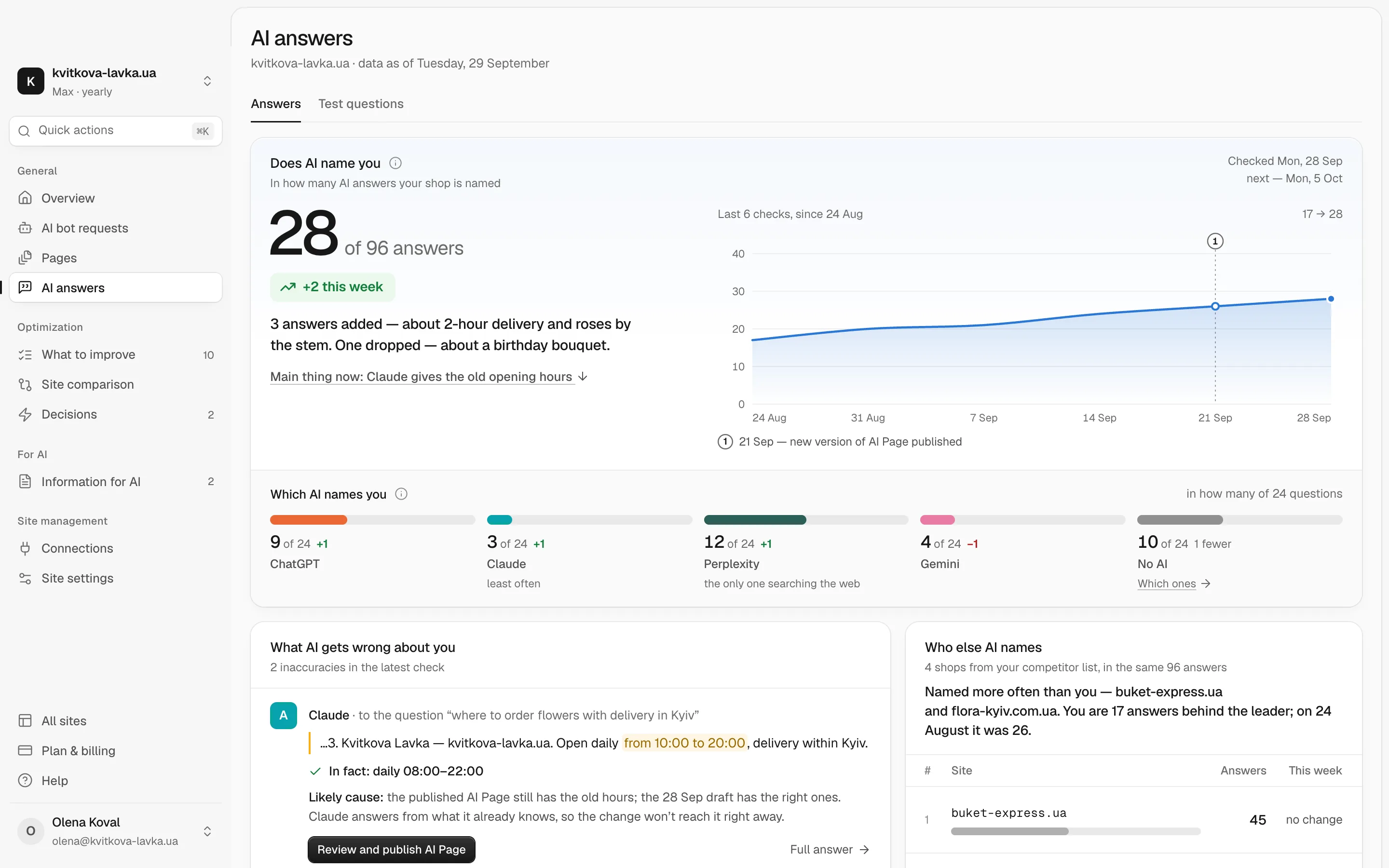
For a first look, the free AI check shows how AI sees your business and what to do so it names you instead of someone else. For the recurring measurement, the AI answers feature on the Max plan ($99 per website per month, see pricing) asks ChatGPT, Claude, Perplexity and Gemini your test questions every week and counts how many answers mention you. Basic and Pro cover the site side: weekly checks and an AI readiness score, and on Pro, which AI bots read which pages and where they run into errors.
Track business results next to mentions, because visibility is not revenue. Seer reports that from November 2024 to 22 October 2026, AI assistants brought it 0.3% of sessions and 0.2% of newsletter signups: 2,359 sessions and 9 signups. Add AI referrals to your analytics report. On the Google side, Google's new help document on identifying Google Search traffic by the HTTP Referer header, noted in the same recap, helps you separate that traffic.
Your next step
A tracking routine is only useful if the questions and setup stay the same from month to month. This week, write your 10–20 questions with IDs, set up the log template above, and run a first baseline before the end of November. Mark the core update, the Gemini 4 Hydrogen launch and the 9–11 November Search Console bug in the context column. Next month, run the same set again and read the gaps against the sources each assistant cited.
Frequently asked questions
Does ChatGPT give everyone the same answer about my brand?
No. Each answer is generated fresh, so the same question can name different brands from one run to the next. Memory, chat history and location can also change it. That is why you should test in a clean session and run each question several times.
How many runs per question are enough to measure AI mentions?
Start with 3–5 runs per question in each assistant, and use more for the questions that matter most. Seer Interactive used 10 runs per prompt per model in its November 2026 measurement. More runs give a steadier mention rate.
Can Google Search Console show my brand mentions in AI answers?
Only on the Google side. Search Console has a Generative AI performance report for AI features in Google Search. It does not cover ChatGPT, Claude or Perplexity. Google confirmed a data logging bug in that report for 9–11 November 2026 that lowered reported impressions, so mark those dates as unreliable.
Do ChatGPT ads count as a brand mention?
Not in an organic tracking routine. ChatGPT now runs ads with bidding options in Ads Manager, so mark any sponsored placement in a separate column. Keep it out of your Share of Model figure.
Is there a free way to track brand mentions in ChatGPT?
Yes. A fixed set of test questions, clean sessions and a spreadsheet log cost nothing but time. Chetver's free AI check gives a first view of how AI sees your business, and the Max plan automates weekly test questions in ChatGPT, Claude, Perplexity and Gemini.