
To track AI bot traffic, read your server access logs or your CDN logs and filter them by AI user agents such as GPTBot, OAI-SearchBot, ChatGPT-User, ClaudeBot, Claude-User and PerplexityBot. GA4 can't do this job. It records the people who click through from an AI answer, not the AI that read your site to write that answer.
I think most businesses look at the wrong report to judge their AI visibility. I would replace the chatgpt.com referral line with three numbers: which AI bots request which pages, which status codes they get back, and whether user-triggered fetchers show up at all.
Why your GA4 "AI traffic" report misses most of it
GA4 works through a JavaScript tag that runs in the visitor's browser. AI crawlers usually download your HTML and do not run your scripts. Vercel's December 2024 analysis of its network found that the major AI crawlers fetch JavaScript files but don't execute them. If no script runs, the tag never fires.
Google also filters bots on purpose. GA4 excludes traffic from known bots and spiders automatically, and you can't turn this off or see how much it removed. So even a bot that did run the tag would not reach your reports.
What's left is referral traffic from chatgpt.com, perplexity.ai and similar sites. Each of those visits is a person who already has an answer and decided to click. Plenty of answers end without a click.
For example, imagine a dental clinic whose price page ChatGPT reads before telling a user what a check-up costs. The user then phones the clinic straight away. The visit that mattered never appears in GA4, even though the clinic's own page provided the answer.
What each tool can actually see
| Tool | What it records | What it misses |
|---|---|---|
| GA4 | Human sessions, including referrals from AI assistants | Crawlers and fetchers. Known bots are excluded by design |
| Clarity Agent Activity | Sessions where an AI agent drives a real browser and the tag fires | Crawlers that only download HTML; agents from operators Clarity does not identify |
| Clarity AI Bot Activity | How AI crawlers and other bots access your content (needs its own setup) | Coverage depends on how you set it up; check Microsoft's documentation |
| Server access logs | Every request: IP, URL, status code, user agent | Requests your CDN answered from cache |
| CDN/edge logs | Every request at the edge, including cached hits and firewall blocks | Nothing on the request side, but some plans keep logs for a short time only |
Microsoft Clarity now treats AI agents as an analytics category of their own
The clearest sign that the market has moved came this month. On 4 November 2026 Microsoft announced Agentic Analytics in Clarity, and MarketingProfs covered it in its 6 November roundup. The Agent Activity dashboard shows which agents visit a site and what they do there: searches, form submissions, logins, downloads, appointment bookings and checkout. Microsoft said weekly agent sessions nearly doubled in three weeks to almost 2 million. That figure comes from Clarity's own data, not from the web as a whole.
There are limits. For now, Clarity identifies agents from only three operators: OpenAI, Google and Anthropic. Microsoft's 29 October study reported agents reaching checkout more often than humans. But Microsoft itself warns that those sessions may include human handoffs. PPC Land also found an arithmetic gap in the percentages, as Relevant Audience reported. I would not build plans on those numbers.
Clarity also has a separate AI Bot Activity dashboard for crawlers, under Dashboards → AI Visibility. You set it up in Settings → AI Visibility. Check Microsoft's documentation to see what your site needs. Its "AI crawl request share" metric is the proportion of all page requests that come from AI bots.
So Microsoft counts humans, agents and crawlers separately. I think your own reporting should do the same.
The three numbers I'd measure instead
1. Which AI bots request which pages
Start with coverage. Do the bots reach your prices, services, opening hours and contact pages? Or do they spend their visits on the home page and old blog posts? AI needs clear, specific facts about your business. If bots never request the pages that hold those facts, that is the first gap to close.
2. Which status codes they get back
A status code is the three-digit answer your server gives to every request. 200 means OK, 301 means "moved", 404 means "not found", and 5xx means a server error. In its December 2024 analysis, Vercel reported that ChatGPT's and Claude's crawlers spent roughly a third of their fetches on 404 pages.
Look for 404s, 5xx errors, 403 blocks from your firewall and chains of redirects. Also look for a quieter problem: a 200 response on a JavaScript-only page, where the bot gets an empty shell instead of your content.
3. Whether ChatGPT-User and Claude-User show up
These two are user-triggered fetchers. They visit your page because someone asked ChatGPT or Claude a question just now. Of anything in your logs, this is the closest sign that an answer is being built from your site.
It is a signal, not proof: a fetch does not mean your business was named in the answer. That is why I pair it with tracking what AI actually says about you. More on that below.
Training, search or user fetch: how to tell AI bots apart
| Operator | User agent | Purpose | robots.txt | Published IP list |
|---|---|---|---|---|
| OpenAI | GPTBot | Training | Respected | gptbot.json |
| OpenAI | OAI-SearchBot | ChatGPT search | Respected | searchbot.json |
| OpenAI | ChatGPT-User | User actions | May not apply | chatgpt-user.json |
| Anthropic | ClaudeBot | Training | Respected | Not confirmed; check Anthropic's help page |
| Anthropic | Claude-SearchBot | Search quality | Respected | Not confirmed; check Anthropic's help page |
| Anthropic | Claude-User | User questions | Respected | Not confirmed; check Anthropic's help page |
| Perplexity | PerplexityBot | Search results | Respected | Yes |
| Perplexity | Perplexity-User | User actions | Generally ignored | Yes |
Sources: OpenAI, Anthropic, Perplexity. Google works differently. Google-Extended is only a robots.txt token with no user agent of its own, so it never appears as a separate line in your logs.
How to track AI bot traffic in your access logs
- Find your logs. On nginx they are usually in
/var/log/nginx/access.log. On Apache, look in/var/log/apache2/or/var/log/httpd/. On shared hosting, check the control panel. On a CDN, look for log export or analytics settings. - Save the AI lines to a separate file:
grep -iE "GPTBot|OAI-SearchBot|ChatGPT-User|ClaudeBot|Claude-SearchBot|Claude-User|PerplexityBot|Perplexity-User" access.log > ai-bots.log - Count pages and status codes for one bot:
grep -i "ChatGPT-User" ai-bots.log | awk '{print $9, $7}' | sort | uniq -c | sort -rn | head -20. In the default combined log format, field 9 is the status code and field 7 is the URL. - Get the status code mix for all AI bots:
awk '{print $9}' ai-bots.log | sort | uniq -c - List the IPs you will verify:
awk '{print $1}' ai-bots.log | sort | uniq -c | sort -rn - Save a snapshot every week, so you can compare before and after each fix.
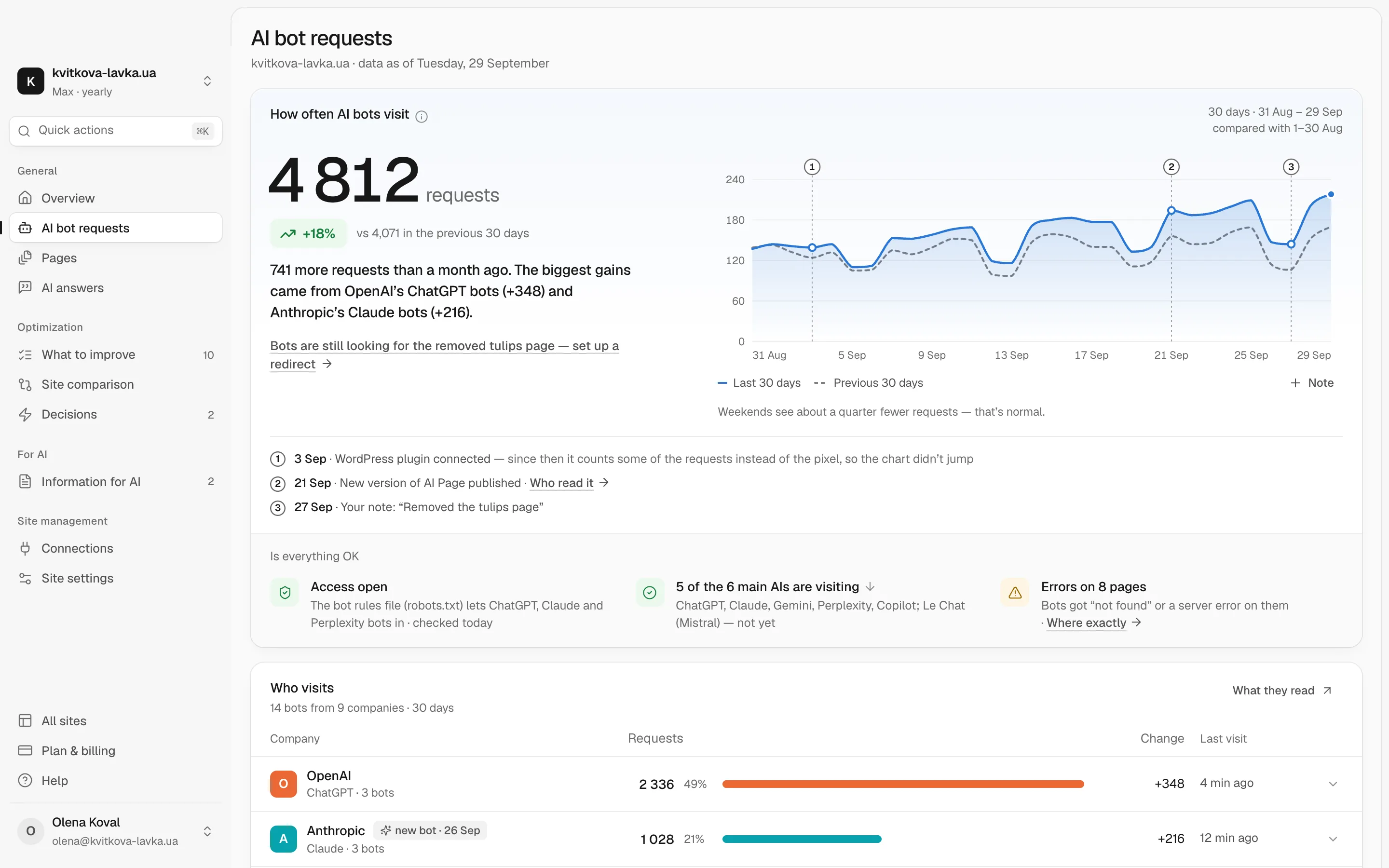
If you'd rather not parse logs by hand, Pulse shows which AI bots visit your site, what they read and where they hit errors. For each problem, it suggests what to change.
How to check that a "GPTBot" is really GPTBot
Anyone can copy a user-agent string. Cloudflare reported undeclared crawlers that used generic browser user agents and rotating IPs. So a bot name in your log is a claim, not proof.
- IP lists. Match the IPs against the JSON files that OpenAI and Perplexity publish. Google publishes its own lists as well.
- Reverse DNS. For Google, run a reverse lookup on the IP (for example,
host 66.249.66.1). Check that the hostname ends in googlebot.com, google.com or googleusercontent.com. Then run a forward lookup on that hostname and confirm it returns the same IP. - No published list. If an operator doesn't publish IP ranges, you can't fully verify its bots. Mark those lines as "claimed", not "verified", in your reports.
- Fakes. Count them separately so they don't inflate your numbers. Block them at the firewall if they cause load, and test that the rule doesn't catch verified bots.
What to fix first
- 5xx errors, timeouts and firewall blocks that verified AI bots run into.
- 404s on URLs the bots actually request. Redirect them to the current page.
- Redirect chains. Point each old URL straight to its final address.
- Pages that send an empty HTML shell. Key facts should be in the HTML the server sends, not loaded later by scripts.
- robots.txt rules or CDN bot settings that block search bots or user fetchers by accident. Chetver's research on llms.txt and other AI-crawler signals in 2026 covers robots.txt and the other signals.
These technical details rarely look urgent. Still, they quietly cost businesses mentions in AI answers.
Where referral clicks still belong in your reporting
Keep GA4. Referral clicks are a real result, and they tell you which AI visits turn into leads. Just treat them as the outcome, not the whole funnel.
Logs show what goes in: what AI reads. Mention tracking shows what comes out: what AI says. Chetver's Share of Model research explains how to measure that last part. If you have all three, you can make one change and measure its effect, instead of guessing.
What I would do in your place
- This week, export one week of access logs or CDN logs and run the grep above.
- Write down the three numbers: bots by page, status codes, and how often ChatGPT-User and Claude-User appear.
- Verify the IPs behind the biggest "AI bot" lines and set the fakes aside.
- Fix errors in the order above, starting with 5xx errors and blocks on pages that hold your prices and services.
- Take the same snapshot a month later and compare. None of this guarantees a mention. It only removes the obstacles you can see, and that is the part you control.
Frequently asked questions
Can GA4 track GPTBot or ClaudeBot visits?
No. GA4 depends on a JavaScript tag that crawlers usually don't run, and Google excludes known bots from GA4 automatically. GA4 shows only the people who click through from AI answers. To see the crawlers themselves, use server access logs or CDN logs.
Does Microsoft Clarity track AI crawlers or only AI agents?
Clarity has two separate dashboards. Agent Activity covers AI agents from OpenAI, Google and Anthropic that drive a real browser on your site. AI Bot Activity, under Dashboards → AI Visibility, covers how crawlers access your content. You set it up separately in Settings → AI Visibility.
Does a ChatGPT-User visit mean ChatGPT mentioned my business?
Not necessarily. ChatGPT-User fetches a page when a user's request needs it, so it's the closest log signal that an answer is being built from your site. To know whether your business was actually named, track the answers themselves.
Do AI crawlers execute JavaScript?
According to Vercel's December 2024 analysis of its network, the major AI crawlers download JavaScript files but don't run them. Content that appears only after scripts run in the browser can be invisible to them. Put prices, services and contacts in the HTML your server sends.
How can I tell if a GPTBot request is fake?
Compare the request IP with OpenAI's published list in gptbot.json. Do the same for OAI-SearchBot and ChatGPT-User with their own files. If the IP isn't on the list, treat the request as unverified, whatever the user-agent string says. If an operator publishes no IP list, mark its lines as claimed, not verified.