ChatGPT Business Hub is OpenAI's new portal for businesses. In it you can claim your business profile in ChatGPT, correct its details, add product feeds and see how often ChatGPT mentions you. OpenAI opened it in beta on 10 November 2026 as part of Businesses in ChatGPT. Any eligible business located where ChatGPT is available can claim a profile. Business Agents, however, are only for US ecommerce and online-service businesses, and claiming a profile does not guarantee more mentions.
What is ChatGPT Business Hub and what launched on 10 November?
OpenAI presents Businesses in ChatGPT as a new way to reach "the 1.2 billion people who use ChatGPT each week". Business Hub is where you manage it. You open it from the ChatGPT sidebar or at chatgpt.com/business-hub. TechCrunch compared the new profiles to the business profiles Google offers.
The launch came only a few days after the first reports. On 6 November, Search Engine Land and PPC Land reported that OpenAI was testing mention and click counts for verified businesses. The beta opened on 10 November, and Search Engine Land and others covered it the same week. Do not confuse the program with ChatGPT Business, which is OpenAI's workplace subscription.
Overview, Agent builder and Products
According to the Hub interface published by Search Engine Roundtable and described by PPC Land, the Hub has three sections. Overview holds your insights. Agent builder is where eligible businesses build, test and launch a Business Agent. In Products you add self-service product feeds with prices and stock levels.
Brand insights and Agent insights
PPC Land reports two dashboard tabs, each with 7-day and 28-day views. Brand insights has tiles for mentions, profile views and website clicks. It also has a chart of mentions over time and your top five discovery topics. Agent insights covers your Business Agent. OpenAI says: "We don't share people's conversations or Business Agent chats with businesses."
Business Agents and ChatGPT Ads
A Business Agent is a branded assistant that answers customer questions inside ChatGPT on your behalf. For now, only eligible ecommerce and online-service businesses in the United States can create one. OpenAI says a business can sponsor its agent and use it as the destination for ChatGPT Ads, as PPC Land reports. Sponsored placements are labeled and kept separate from normal ChatGPT answers. OpenAI told Digiday that claiming a profile and publishing an agent are free at launch, as VentureBeat reports.
Who can claim a business in ChatGPT?
You can claim if you own the business or are authorized to represent it. You do not need an Ads account or a ChatGPT Enterprise agreement, according to the OpenAI Help Center. The table below combines OpenAI's rules with reports from the first days after launch. Rows marked "third-party" are early reports, not OpenAI policy.
| Business type | Claim a profile | Business Agent |
|---|---|---|
| US online store or online service | Yes | Yes, if eligible |
| Online store or service outside the US, in a country where ChatGPT is available | Yes | Not yet |
| Physical store or restaurant in the US | Existing listings only (third-party) | Not stated |
| Physical or local business outside the US | Not yet (third-party) | No |
| Brand with several locations | Each location is a separate claim (third-party) | US rules apply |
| Shopify merchant | Yes. Connect your store to speed up verification | US rules apply |
| Enterprise customer or advertiser | Through your OpenAI representative | US rules apply |
The third-party rows come from Pasquale Pillitteri, Citeme and Hans van Gent. In Citeme's walkthrough, the "physical location" option led to a waitlist. Some claims also stalled on launch day: PPC Land reports that a Brazilian agency was put on a waitlist. OpenAI plans to expand "to more markets and business categories" but has not given dates.
What this means for businesses outside the US
First, find your country on OpenAI's list of supported countries. That list decides what "where ChatGPT is available" means. If your country is listed, an online store, SaaS product or online service can most likely claim and verify a profile now. It cannot create a Business Agent, because agents are US-only.
Clinics, law offices, cafés and shops that serve customers at a street address will probably have to wait for now. For example, imagine a dental clinic in Almaty. It cannot claim its location yet. It can still make sure its website and directory listings all state the same facts, because those sources stay public whether or not the clinic has a ChatGPT profile.
If ChatGPT is not available in your country, your business does not meet OpenAI's basic condition. Do not look for workarounds. Verification checks your business phone or domain and a government ID, so the claim has to match a real business in a supported country. Work instead on the sources any assistant can read: your website and your public listings.
How to claim your business in ChatGPT, step by step
- Sign in to ChatGPT with the account that will manage the profile. We recommend an account your company controls, not one that belongs to a contractor.
- Open Business Hub from the sidebar.
- Search for your business by name. Select the matching listing, including the street address if you have a location, or create a new one.
- Confirm the managing account and verify ownership. You can use a text or call to your main business number, your business email, your website domain (a DNS record) or Shopify.
- Wait for review. The status moves from "Claim received" to "Review in progress", and the decision arrives by email. You can withdraw the claim during review.
- Pass the Persona identity check with a government ID. Until you do, you cannot publish changes, view insights or create an agent.
- Review every profile field. Verified profiles get a blue checkmark.
- If you sell products, add a product feed in Products with current prices and stock levels.
How to fix wrong facts in your ChatGPT profile
OpenAI's sign-up page says ChatGPT "may use this information to answer customer questions". As PPC Land puts it: "May, not will". Your profile is one source among many, so the goal is for every source to say the same thing. Our research on how visibility rules change from SEO to GEO covers the other sources AI assistants draw on.
Make your NAP match everywhere
NAP stands for name, address and phone number. These are the basic identity facts that should be the same everywhere your business appears. We recommend updating your sources in this order:
- Your website: trading name, address, phone, opening hours, prices, and delivery and return terms.
- Google Business Profile, Bing Places and the main directories in your industry.
- Your ChatGPT profile, using the exact wording from your website.
Claim each location separately
According to Hans van Gent's reading of the launch flow, claiming the main brand does not claim its locations. There is also no central way to manage several locations yet. Keep a simple sheet that lists each location, its claim status, its verified phone number and its manager.
Your listing exists whether you claim it or not
The Businesses in ChatGPT Terms say OpenAI may display a listing "regardless of whether you claim, manage, or cease managing it". OpenAI has not described a way to dispute a profile that someone else claimed. The Terms also say that by using Business Hub, you agree that OpenAI's AI assistant may phone your business on behalf of people who use ChatGPT. Make sure your verified phone number reaches someone who can answer.
How to read the Business Hub numbers
The Help Center defines the metrics narrowly and says insights show activity over the past 28 days. PPC Land reports that the dashboard also has a 7-day view.
| Metric | What it counts | What it does not tell you |
|---|---|---|
| Mention (online business) | Answers where ChatGPT references your website | Mentions of your brand name alone |
| Mention (local business) | Answers where ChatGPT shows that location as a result | Whether anyone opened the listing or visited your site |
| Website clicks | Recorded clicks on links to your site in ChatGPT | Whether a visit or a sale followed |
| Discovery topics | Common themes in answers that mentioned or cited you | The actual prompts or the customer's intent |
This means the Hub's click count will not match the ChatGPT visits in your web analytics. Compare trends over time, not totals.
Why many mentions and few clicks is normal
PPC Land reported the first live dashboards. BuildUp Bookings showed 690 mentions and 24 website clicks over 28 days. Another business, Zianvo, showed 28 mentions and 1 click. In both, about 3.5% of mentions led to a click. OpenAI's demo dashboard for a fictional toy shop shows about 35%, roughly ten times higher. PPC Land calls the live examples "anecdotes, not a benchmark". Many people get their answer in the chat and never click, so compare your ratio with your own history, not with the demo.
Blank tiles and delayed data
Insights appear only when there are enough conversations to meet thresholds that OpenAI does not disclose. Until then, the tiles show dashes. On launch day, live dashboards were labeled "Data through Nov 9 (UTC)". That points to a reporting delay of at least a day. It also suggests the counts include activity from before the business claimed its profile.
Who owns the data, and what agencies should do
The Terms say you keep your rights in Customer Data, but "OpenAI owns all rights in Businesses in ChatGPT and Insight Data". If you are an agency, we recommend that each client claims the profile with an account the client controls. Read the Terms with the client before you build reports on Hub data. Keep your own record of each month's figures, because both the data and its definitions belong to OpenAI and can change during the beta.
What ChatGPT Business Hub doesn't show, and how to fill the gaps
The Hub gives you the first official data from OpenAI on how ChatGPT presents your business. Trending Topics and PPC Land point out clear limits. PPC Land notes: "It offers no competitive view at all." The Hub does not show:
- Any other assistant: Claude, Gemini, Perplexity and Grok are not covered.
- The questions where ChatGPT names a competitor instead of you.
- Recommendations of your brand name without a link to your website.
- Bot visits. OpenAI's crawlers include OAI-SearchBot, which serves ChatGPT search, and ChatGPT-User, which visits pages when a user's chat requests them (see OpenAI's crawler docs). The Hub shows a "Website access" panel, but OpenAI has not explained what it checks.
Measure your Share of Model across assistants
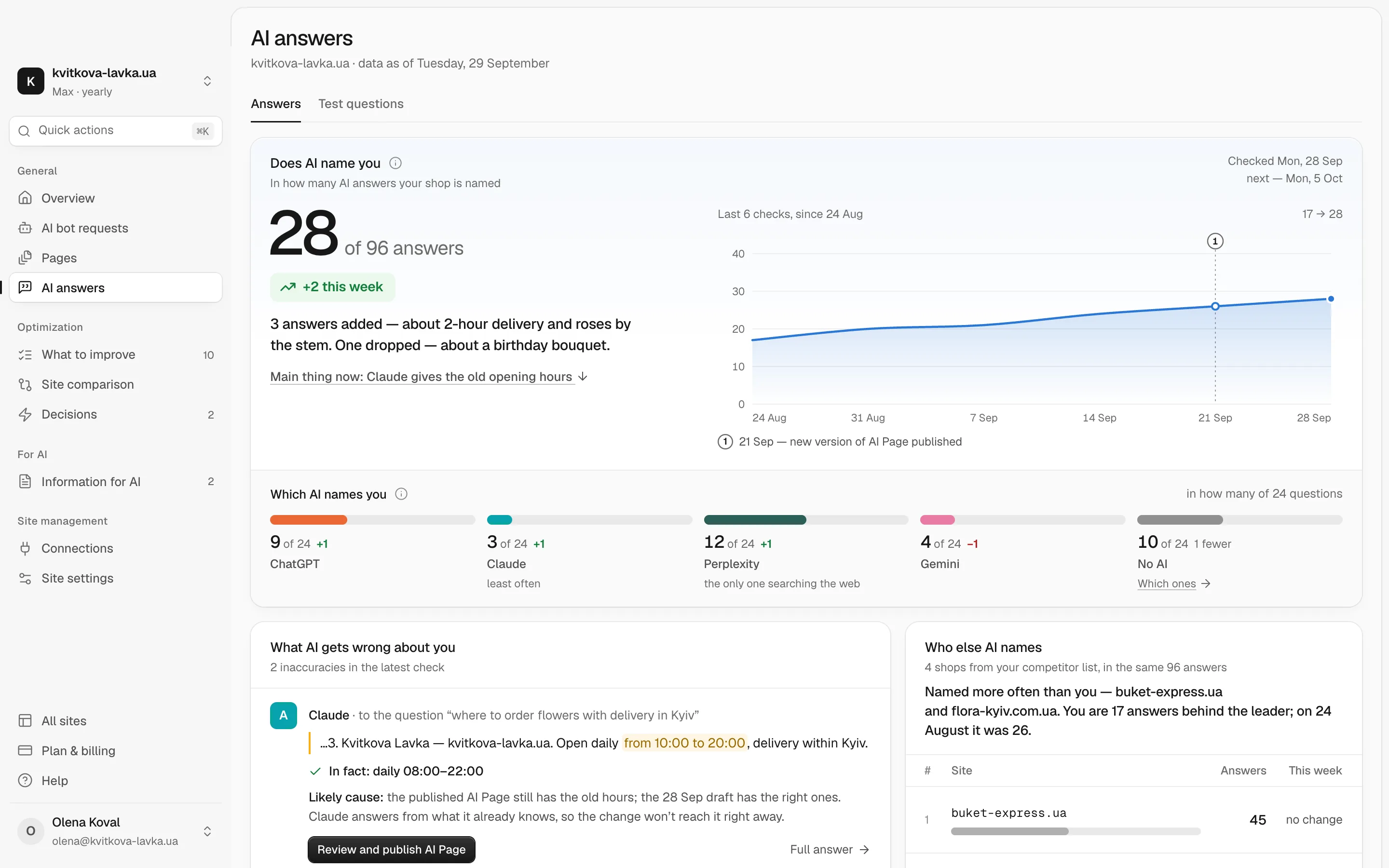
Share of Model is the share of AI answers to relevant questions that name your business. Our research on measuring Share of Model explains how to choose your questions. Ask the same buyer questions in each assistant every week and note who gets named. On the Chetver Max plan, AI answers does this every week for ChatGPT, Claude, Perplexity and Gemini and counts how many answers mention you.
Check which AI bots read your pages
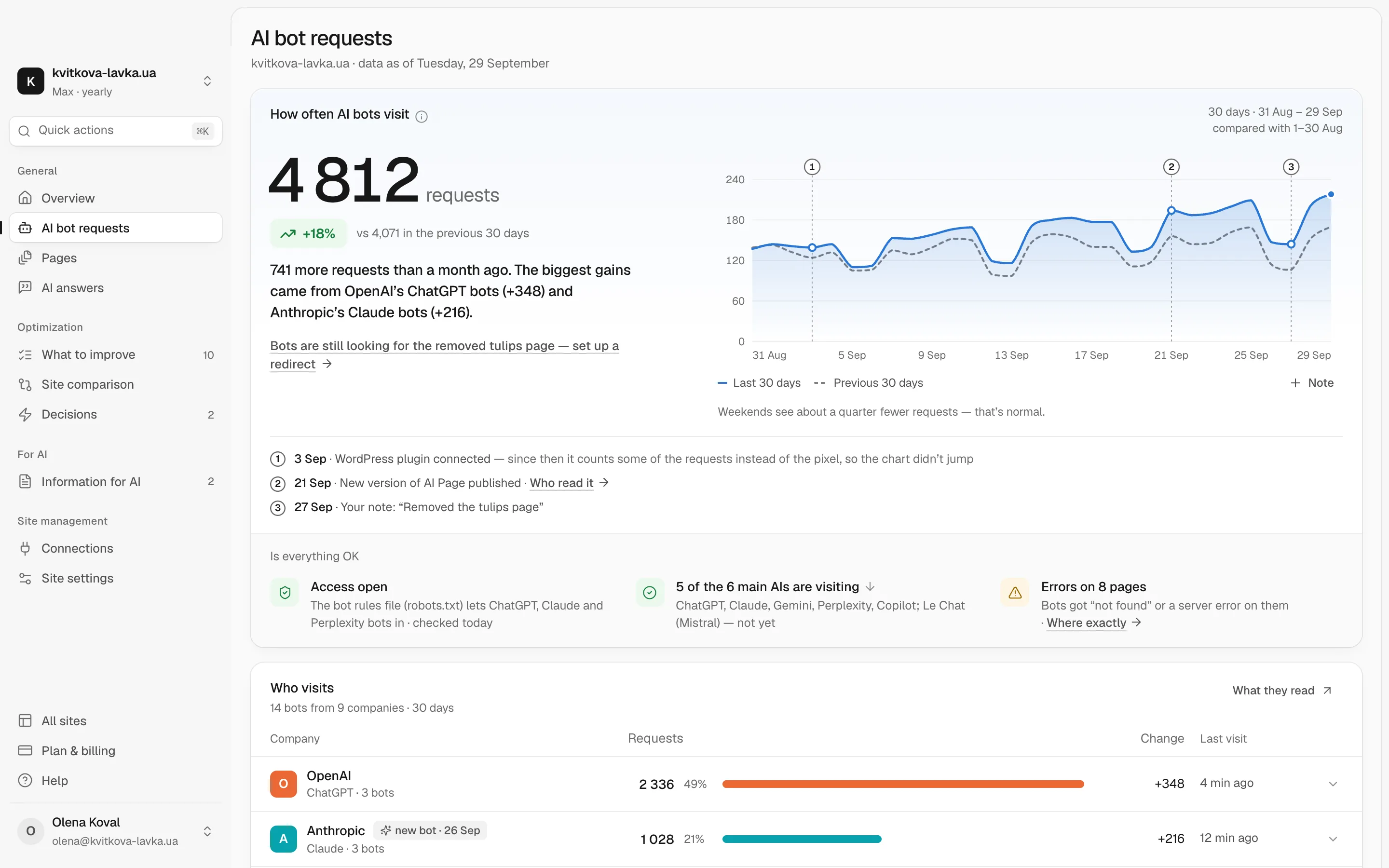
Pulse shows which bots from ChatGPT, Claude, Gemini and other assistants visit your site, what they read and where they run into errors. Each problem comes with advice on what to change. If your robots.txt file or firewall may be blocking OpenAI's bots, our research on llms.txt and other AI-crawler signals explains which settings matter.
Give every assistant the same facts
AI Page is one page with your prices, opening hours, contacts and services. Chetver builds it from your website, and you publish it on aipage.yoursite.com together with an llms.txt file. This puts the facts from your ChatGPT profile in one place where Claude, Gemini, Perplexity and other assistants can read them too.
Your ChatGPT Business Hub checklist for this week
- Confirm that your country is on OpenAI's supported list, and find your business type in the table above.
- Choose a company-controlled ChatGPT account to manage the profile.
- Claim and verify your business, then complete the Persona check.
- Correct the facts on your website first, then your other listings, then the Hub profile.
- Add a product feed if you sell online.
- Record your baseline: mentions, clicks, discovery topics and the date of the data.
- Ask ChatGPT, Claude, Gemini, Perplexity and Grok your main buyer questions and note which competitors they name.
- Check that your robots.txt file and firewall let OAI-SearchBot and ChatGPT-User reach your site.
Business Hub shows how ChatGPT presents you, measured by OpenAI's narrow definitions. To see how the other assistants see you as well, start with a free AI check of your website.
Frequently asked questions
Is ChatGPT Business Hub free?
Yes, at launch. OpenAI told Digiday that eligible businesses can claim a profile and publish a Business Agent for free. You do not need an Ads account or a ChatGPT Enterprise agreement to claim your business.
Can a business outside the US claim a profile in ChatGPT?
Yes, if it is an eligible business located in a country where ChatGPT is available. Early third-party reports suggest that online stores and online services outside the US can claim now, but businesses that serve customers at a street address cannot yet. Business Agents are currently only for eligible US ecommerce and online-service businesses.
Does my brand name count as a mention in Business Hub?
Not for an online business. The OpenAI Help Center says a mention counts when ChatGPT references your website, and the brand name alone does not count. For a local business, a mention counts when ChatGPT shows that location as a result.
Why do I have many mentions but very few clicks?
Many people get their answer in the chat and never visit a website. One early live dashboard, reported by PPC Land, showed 690 mentions and 24 clicks over 28 days, about 3.5%. Compare your ratio with your own history, not with OpenAI's demo dashboard.
Does claiming my business make ChatGPT recommend me more?
OpenAI does not say that claiming changes how often a business is mentioned or how it ranks. The sign-up page says ChatGPT may use your information to answer questions, not that it will. Claiming helps keep your facts correct, but it does not guarantee mentions.
Does Business Hub show my visibility in Gemini, Claude or Perplexity?
No. Business Hub covers ChatGPT only. It also shows no prompts and no comparison with competitors. To see other assistants, run your own question checks or use a separate tracking tool.