
On many desktop brand searches, Google now shows an AI Overview in the right-hand column, the spot where the knowledge panel used to be. So the first summary people see about your business is written by Google's AI, and they see it before your own website. You can't edit that summary directly. You can check what it says, find the sources it cites and correct the facts in those sources.
What changed in Google brand search in September–November 2026
The AI Overview moved into the knowledge panel spot
An AI Overview is the AI-written summary Google shows with the search results, with links to the pages it used. A knowledge panel is the box of facts about a company or person, such as a logo, a description, an address and links, that Google has long shown on the right of desktop results.
On 2 November 2026, Search Engine Roundtable reported that Google had moved AI Overviews for many brand searches into the right-hand column. Before, they appeared at the top or in the middle of the main results. Barry Schwartz wrote that Google is "essentially replacing brand knowledge panels with AI Overviews", with Apple, Zillow, Coke and Google as examples. On the same day, Chris Long of Nectiv posted the same observation.
David McSweeney spotted the change on 31 October. He saw the AI Overview "generally in a right panel on desktop (or in some cases further down the page)", so the layout is not the same for every search. A few days earlier, on 27 October, Sachin Patel had seen an "AI-generated" label on a knowledge panel. Google has not announced the change. A Google spokesperson told PPC Land only that AI Overviews "create new opportunities for brands".
Brand AI Overviews became the norm in September
The move came after a sharp rise in AI Overviews on brand searches. On 30 September, Chris Long reported AI Overviews for 93 of the 100 enterprise brands he tested. He did not publish the full list.
According to Semrush, DemandSphere tracked branded queries across all markets and devices. The share with an AI Overview went from 26.12% on 1 September to a peak of 90.48% on 27 September, then stood at 82.06% on 29 September. Ahrefs data for US desktop results showed 65.1% in August and 82.91% on 29 September. These figures count whether an AI Overview appeared, not whether the brand was mentioned or cited in it. Google has not announced a change for branded searches.
Citation cards now show Google's own summary
Citation cards are the source links shown beside or below an AI Overview. On 23 October, Search Engine Roundtable reported that Google is testing or rolling out AI-written summaries inside these cards, on some searches but not all. Brodie Clark noted that the text does not appear on the source page as written. Google writes the summary based on what it thinks is most relevant to the search. So even when Google cites your own page, the words under your link may be Google's paraphrase.
Why an AI Overview on brand search matters for small and mid-size businesses
A person who searches your business name is close to a decision. They want to know if you are real, what you cost, where you are and what others say about you. The AI Overview now answers that before they click your link.
On a claimed knowledge panel, you could suggest edits. The AI Overview text can't be edited. In the Search Engine Roundtable example, the claimed panel header with "Suggest edits" still sits above the AI Overview. Google has not said whether those edits change the AI text.
Small businesses can be more exposed than Apple or Zillow. Many have no Wikipedia page and no knowledge panel, and only a few pages on the web describe them. Google has said that when AI Overviews are wrong, the usual reasons are a misread query or "data voids", where not enough good information is available. For a small business, one outdated directory listing can become the main source.
For example, imagine a physiotherapy clinic that moved across town two years ago. Its website shows the new address, but three directories and an old local news story still show the old one. If the AI Overview cites those pages, it can send patients to the wrong street.
So far, all published reports use big brands as examples. Nobody has published data on how often small businesses get the new layout, so check your own brand searches instead of guessing.
How to check your AI Overview on brand search, step by step
- Run four brand searches on desktop and mobile, and save the results.
- List the sources the AI Overview cites.
- Fix wrong or outdated facts at the source.
- Give crawlers one clean page of facts, and make sure they can reach it.
- Report factual errors, then repeat the check every week.
Step 1: Run four brand searches and save what you see
- Open a private browser window, so your search history doesn't affect the results. Write down the city or country you are searching from.
- Search for:
[brand],[brand] reviews,[brand] pricesand[brand] [city]. - Do this on desktop and on mobile. Reports describe the right-hand column on desktop only. On mobile, simply note where the AI Overview appears, if it appears at all.
- Take a dated screenshot of each result. Copy the AI Overview text into a document.
Step 2: List the sources it cites
Open every citation card. Sort the sources into groups: your own site, directories, review sites, Reddit or forums, old press coverage and competitor pages. For each card, compare the summary with what the page actually says. Next to each wrong fact, write down the source it most likely came from.
Step 3: Fix wrong or outdated facts at the source
- Your site. Update the About, Contacts and Pricing pages. Put the key facts in plain text, not only in images, and show when the page was last updated.
- Structured data. Structured data is code on your page that describes your business in a format machines can read. Add Organization JSON-LD with
name,url,logo,address,telephone,emailandsameAslinks to your official profiles. Google says this helps it understand your organization and tell it apart from others. Local businesses can add LocalBusiness markup for opening hours, address, phone and price range. The markup should match the visible text on the page. - Google Business Profile. Edit your name, address, phone, hours and website directly. Google reviews some edits before they appear.
- Consistent contact details. NAP means name, address and phone. Use exactly the same NAP on your site, your profile and every directory.
- Third-party pages. Ask directory owners and editors to correct outdated facts. On review sites, reply to old complaints with what has changed since.
- Knowledge panel. If you have one, get verified and suggest edits.
Step 4: Give crawlers one clean page of facts
Google's guidance on AI features says there are no extra requirements for AI Overviews. A page must be indexed and eligible to appear in Search with a snippet. If you add noindex, nosnippet, data-nosnippet or a short max-snippet to a page, Google uses less of it, or none of it, in AI features. The AI Overview then has to rely more on other sources. Blocking Google-Extended does not remove you from Google Search, and it does not stop AI Overviews.
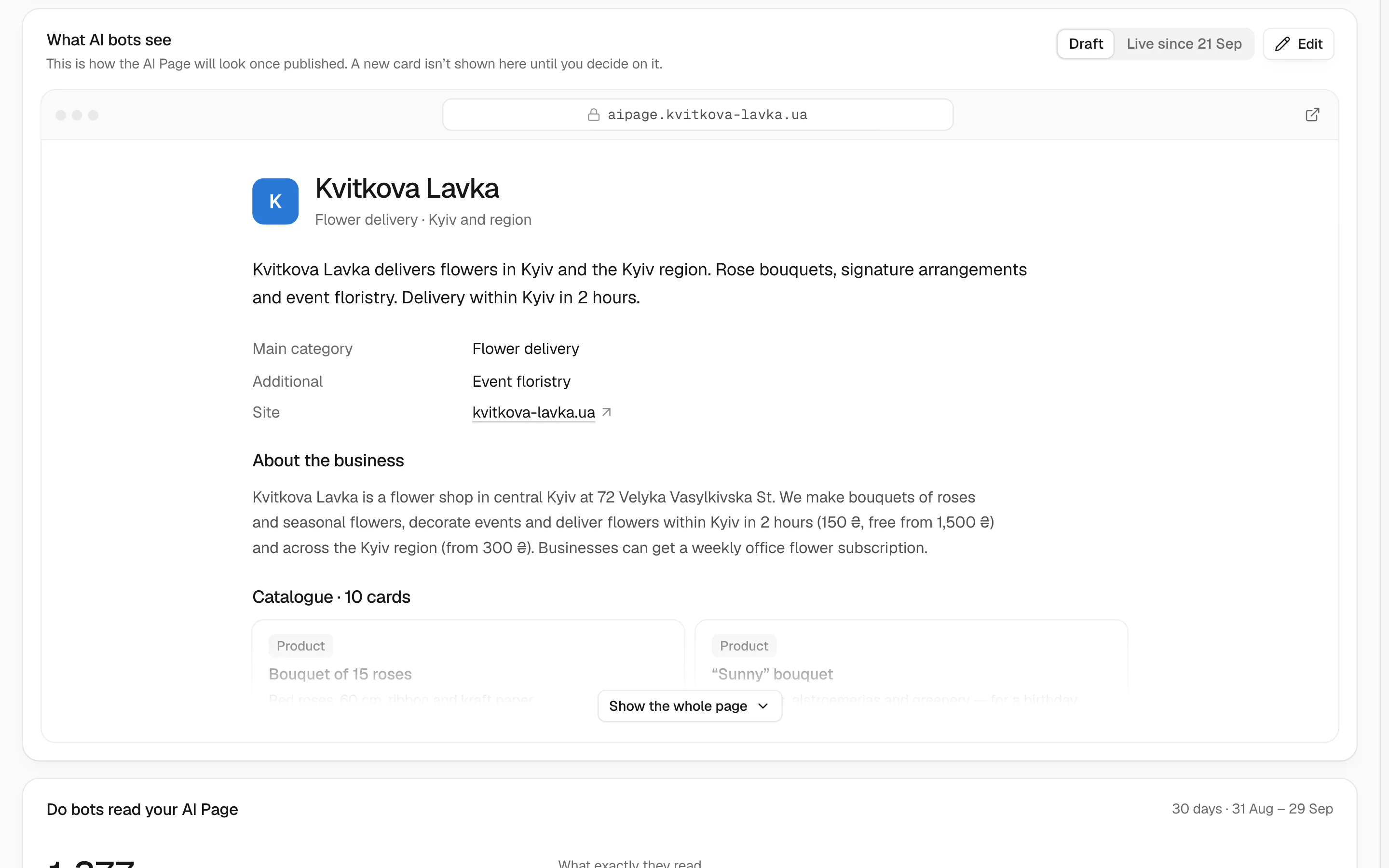
It helps to keep all your key facts on one page. Chetver's AI Page builds such a page from your website, with prices, hours, contacts and services, plus an llms.txt file. You publish it on aipage.yoursite.com. Make sure Googlebot can crawl and index it like any other page. To see which AI bots actually reach your pages and where they hit errors, use Pulse. To review your crawler rules, read our research on llms.txt and the other AI-crawler signals in 2026.
Step 5: Report errors and re-check every week
If the AI Overview states a wrong fact, use the feedback option on the AI Overview. Say exactly what is wrong and what is correct. Then repeat Step 1 every week, with the same searches, devices and location. Keep a simple log with the date, search, device, summary, cited sources and what changed. The log shows which fixes Google has picked up.
Brand query checklist: what to look for and where to fix it
| Search | What to look for | Where to fix it |
|---|---|---|
| Brand name | Wrong description or category; confusion with a company with a similar name | About page, Organization JSON-LD with sameAs, claimed knowledge panel |
| Brand + reviews | Which review sites are cited; old complaints shown as current | Replies on review platforms, Google Business Profile reviews |
| Brand + prices | Old prices, discontinued plans, wrong currency | Pricing page with an update date, directory listings, AI Page |
| Brand + city | Address, hours, phone, branches | Google Business Profile, LocalBusiness JSON-LD, Contacts page, directories (NAP) |
| Brand + "legit" or "scam" | Forum threads, old disputes, confusion with a similar name | About page with company registration details, factual replies in threads |
| Brand vs competitor | Wrong features, outdated comparisons | Features or comparison page on your site; ask authors of third-party comparisons to update them |
What you can't control
Brands can't edit the AI Overview text. Google hasn't said whether "Suggest edits" in the knowledge panel affects it. Feedback reports don't guarantee a change, and Google has not said how long an update takes. The layout also keeps changing. On 11 November, Search Engine Roundtable reported that Google was placing source icons at the bottom of AI Overviews.
Your next step
This week, run the four brand searches, save the screenshots and list the cited sources. Fix the facts at those sources first. People also ask ChatGPT, Claude, Gemini and Perplexity about businesses, so check those answers too. Our free AI check shows how AI sees your business and what to do so it names you, not a competitor.
Frequently asked questions
Can I turn off the AI Overview for my brand name?
No. Brand owners have no setting to remove the AI Overview from searches for their name. You can stop Google from using your own pages with noindex or nosnippet, but then the AI Overview relies more on third-party sources. It is usually better to keep your pages eligible and make sure their facts are correct.
How do I correct wrong information in Google's AI Overview about my business?
Find the sources the AI Overview cites, and correct the facts there: your site, structured data, Google Business Profile, directories and review sites. Then report the error with the feedback option on the AI Overview. Google does not promise to change the text, so check the same searches every week.
How long does it take for the AI Overview to update after I fix my facts?
Google has not published a timeline. It first has to recrawl the corrected pages, and you can ask it to recrawl your own pages in Search Console. Third-party pages update when their owners make the change. Repeat the same searches weekly and log what changes.
Does Organization or LocalBusiness schema guarantee correct facts in the AI Overview?
No. Google says Organization markup helps it understand your business and tell it apart from others, but it does not say that markup controls what AI Overviews write. Markup works best when it matches your visible pages, your Google Business Profile and your directory listings.
Does blocking Google-Extended stop AI Overviews about my brand?
No. Google-Extended controls whether your content is used to train and ground Gemini models, and Google says it does not affect your inclusion in Google Search. AI Overviews are part of Search and use pages that are indexed and eligible for snippets.
Does the knowledge panel still matter now that AI Overviews show for brands?
Yes, if you have one. In the Search Engine Roundtable example, the claimed panel header with "Suggest edits" still appears above the AI Overview. Google hasn't said whether those edits affect the AI text, but keeping the panel accurate costs little.