
Robots.txt for AI crawlers works one bot at a time. There is no single "AI" switch. If you want to appear in ChatGPT, Claude and Perplexity answers, allow the search crawlers (OAI-SearchBot, Claude-SearchBot, PerplexityBot) and the user-triggered fetchers (ChatGPT-User, Claude-User, Perplexity-User). Blocking training crawlers and tokens such as GPTBot, ClaudeBot, Google-Extended and Applebot-Extended is a separate decision. OpenAI states that each of its crawler settings is independent of the others.
Robots.txt is a plain text file at the root of your site (yoursite.com/robots.txt). It tells crawlers which pages they may fetch. On 2 November 2026, ChatGPT consumer product lead Adam Fry said ChatGPT's volume of search-like queries is roughly one-fifth of Google's. Treat that figure with care. According to press reports, OpenAI counts a search when a user's question triggers a web search, and Fry gave no absolute number. The MarketingProfs AI Update also noted that OpenAI did not name the source of its Google comparison.
Whatever the exact share, ChatGPT can only show your pages in those answers if its search crawler can reach them. This guide covers that technical step: making sure the right bots can get in.
Why do sites block AI bots without meaning to?
A block on ChatGPT or Claude is often not a decision anyone made. It comes from a default setting, a rule copied from somewhere else, or a security tool. Check these four causes first.
CDN and hosting "block AI bots" switches
A CDN (content delivery network) is a service that sits between your server and your visitors. It speeds up the site and filters traffic. On 1 July 2025, Cloudflare announced that it blocks known AI crawlers by default for new domains. Owners can choose to allow them, and Cloudflare also offers a managed robots.txt.
If your domain was added to Cloudflare after that date, or someone clicked a "block AI" option, AI bots may be stopped before they ever see your robots.txt. Open the setting and check which bots it covers. A broad "AI bots" switch can affect search crawlers as well as training crawlers. Look for similar options in your hosting panel and in any other CDN you use.
Copied rules and a blanket Disallow
Some sites still serve User-agent: * followed by Disallow: /. This is often left over from a staging site or a redesign. It asks every crawler that follows robots.txt to stay out, including AI search crawlers. Other sites paste a long "block all AI" list from a blog post without checking which bots it names.
Firewall rules that answer bots with 403 or a challenge
A WAF (web application firewall) blocks traffic that looks automated. "Bot fight" modes, rate limits and country blocks can send AI bots a 403 (forbidden), a 429 (too many requests) or a CAPTCHA page. Your robots.txt can say "allow," and the bot still gets nothing it can read.
Outdated bot names
Older rule lists often name anthropic-ai or Claude-Web, tokens Anthropic used before ClaudeBot. Anthropic's current documentation describes three bots instead: ClaudeBot, Claude-User and Claude-SearchBot. A file that names only the older tokens does not cover the current bots. You may think you have opted out of training when you have not.
Which AI crawlers can you block, and what does each block cost?
OpenAI and Anthropic each run separate bots for training, for search indexing and for fetching a page when a user asks. Perplexity runs a search crawler and a user fetcher. Google and Apple use opt-out tokens instead of separate training crawlers.
Training crawlers and tokens: GPTBot, ClaudeBot, Google-Extended, Applebot-Extended
These control whether your content may be used to train future models. They do not decide whether you appear in ChatGPT, Claude or Perplexity search answers. Google-Extended needs a closer look, because it also covers grounding in Gemini Apps.
- GPTBot (OpenAI): if you disallow it, you indicate that your content should not be used to train OpenAI's foundation models.
- ClaudeBot (Anthropic): if you restrict it, you signal that your site's future materials should be excluded from training datasets.
- Google-Extended is a robots.txt token, not a separate crawler. It controls whether content Google crawls may be used for Gemini training and for grounding in Gemini Apps. Grounding means giving the model fresh web content at the moment it answers. Google-Extended does not affect your inclusion or ranking in Google Search.
- Applebot-Extended also does not crawl pages. It tells Apple whether data that Applebot collected may be used to train Apple's foundation models. Siri and Spotlight still use Applebot.
Search and index crawlers: OAI-SearchBot, Claude-SearchBot, PerplexityBot
These bots build the index that AI assistants search when they answer questions. Blocking them has the most direct cost. OpenAI says sites that opt out of OAI-SearchBot "will not be shown in ChatGPT search answers," although they can still appear as navigational links. Anthropic says disabling Claude-SearchBot may reduce your visibility and accuracy in user search results. Perplexity describes PerplexityBot as the bot that surfaces and links websites in its search results, and says it is not used to train foundation models.
User-triggered fetchers: ChatGPT-User, Claude-User, Perplexity-User
These bots visit a page when a person asks for it. For example, imagine a customer pastes your pricing page into ChatGPT and asks for a summary. OpenAI says ChatGPT-User is not used for automatic crawling. Because a user starts these requests, "robots.txt rules may not apply." Perplexity says Perplexity-User generally ignores robots.txt for the same reason. Anthropic says its bots honor robots.txt, and that disabling Claude-User "may reduce your site's visibility for user-directed web search."
So robots.txt may not stop OpenAI's and Perplexity's fetchers at all. If they still cannot read your pages, look at your firewall and CDN rules first.
AI crawler list: owner, job, cost of blocking and recommended rule
The rules in the last column assume the most common choice: stay out of training, but show up in AI answers. If you are happy for your content to be used in training, allow everything.
| Bot / token | Owner | Job | What blocking costs you | Recommended rule |
|---|---|---|---|---|
| GPTBot | OpenAI | Collects content for model training | Nothing in ChatGPT search; it is a training opt-out | Disallow (if you opt out of training) |
| OAI-SearchBot | OpenAI | Indexes sites for ChatGPT search | Not shown in ChatGPT search answers | Allow |
| ChatGPT-User | OpenAI | Fetches a page when a user asks | ChatGPT cannot open your page for the user | Allow; do not block it in the firewall |
| OAI-AdsBot | OpenAI | Checks landing pages submitted as ChatGPT ads against policy; OpenAI says its data is not used for training | OpenAI cannot check your ad landing pages | Allow if you advertise on ChatGPT |
| ClaudeBot | Anthropic | Collects content for model training | Your future content is excluded from training datasets | Disallow (if you opt out of training) |
| Claude-SearchBot | Anthropic | Indexes sites for Claude's search | Lower visibility and accuracy in Claude's search results | Allow |
| Claude-User | Anthropic | Fetches a page when a user asks | Lower visibility for user-directed search | Allow |
| PerplexityBot | Perplexity | Surfaces and links sites in Perplexity search | Your site is not surfaced and linked by its search crawler | Allow |
| Perplexity-User | Perplexity | Fetches a page when a user asks | Perplexity cannot read your page for the user | Allow; do not block it in the firewall |
| Google-Extended | Token: Gemini training and grounding in Gemini Apps | Content not used for Gemini training or grounding; no effect on Google Search | Your choice: disallow to opt out of training, allow if Gemini grounding matters more | |
| Applebot-Extended | Apple | Token: Apple model training | No effect on Siri or Spotlight | Disallow (if you opt out of training) |
Googlebot and Bingbot are not in the table because no AI-specific token replaces them. Google's AI Overviews and AI Mode rely on Googlebot and the usual Search controls, not on Google-Extended. Microsoft has no separate AI training token. For Bing Chat (now Copilot), Microsoft offers NOCACHE and NOARCHIVE meta tags to limit how your content is used in chat answers. If you block Googlebot or Bingbot, you lose far more than AI answers.
A robots.txt template for AI crawlers: stay out of training, show up in answers
Copy the template below and replace the private paths and the sitemap URL with your own. Several User-agent lines can share one group of rules.
# AI search and index crawlers: allow
User-agent: OAI-SearchBot
User-agent: Claude-SearchBot
User-agent: PerplexityBot
Allow: /
Disallow: /checkout/
Disallow: /account/

# User-triggered fetchers: allow
User-agent: ChatGPT-User
User-agent: Claude-User
User-agent: Perplexity-User
Allow: /
Disallow: /checkout/
Disallow: /account/

# Training crawlers and tokens: opt out
User-agent: GPTBot
User-agent: ClaudeBot
User-agent: Google-Extended
User-agent: Applebot-Extended
Disallow: /

# Everyone else, including Googlebot and Bingbot
User-agent: *
Disallow: /checkout/
Disallow: /account/

Sitemap: https://www.example.com/sitemap.xml
Do not skip these four details:
- Repeat your private paths in every named group. A crawler obeys only the most specific group that matches it. Once you name OAI-SearchBot in its own group, it ignores everything under
User-agent: *, including your/checkout/rule. - Decide on Google-Extended separately. It sits in the opt-out group above, but it also covers grounding in Gemini Apps. If visibility in Gemini matters more to you than the training opt-out, remove that line.
- Use a full URL in the Sitemap line. The line can sit anywhere in the file, but it must be an absolute address. It should point to a sitemap that actually loads.
- Slow bots down instead of blocking them. If server load is your concern, Anthropic supports the non-standard
Crawl-delayrule, for exampleCrawl-delay: 1. Put it in a group that names only Anthropic's bots. This is a better option than blocking its search crawler.
If you want your content used for training too, delete the training group. Those bots will then follow the * group. OpenAI notes that if you allow both GPTBot and OAI-SearchBot, it may use one crawl for both purposes.
How do you check that your robots.txt rules actually work?
A correct file on your laptop proves little. What counts is what each bot gets when it requests your site. Work through these steps in order.
- Check your CDN and WAF bot settings. Look for AI-bot block switches, managed robots.txt, bot fight modes and rate limits. If your CDN manages robots.txt, it may replace or add to the file you uploaded.
- Open the live robots.txt on every host. Check yoursite.com, www.yoursite.com and every subdomain that serves content. Each host needs its own file. The response should be a 200 with plain text, not an HTML page, a login screen or a CAPTCHA. Under the Robots Exclusion Protocol (RFC 9309), crawlers must treat a robots.txt that returns a server error (5xx) or cannot be reached as a complete disallow.
- Test each user-agent group. Read the file as each bot would. Find the group that names it. If no group names it, use
*. Then confirm that the result matches the table above. Watch for typos: a misspelled bot name creates a group that no bot uses. - Read your server logs. Filter by user agent for GPTBot, OAI-SearchBot, ChatGPT-User, ClaudeBot, Claude-SearchBot, Claude-User, PerplexityBot and Perplexity-User. Look for 403, 429 and 5xx responses. Google-Extended and Applebot-Extended will never appear, because they are tokens, not crawlers. OpenAI says OAI-SearchBot and GPTBot may add a "robots.txt" marker to their user agent when they fetch the file, so you can tell those requests apart from page requests.
- Verify bots by IP before you allow-list them. Anyone can fake a user agent. OpenAI publishes IP ranges at openai.com/searchbot.json, openai.com/gptbot.json and openai.com/chatgpt-user.json, and recommends allowing OAI-SearchBot's ranges. Perplexity publishes ranges for its bots too. For Anthropic, follow the verification guidance on its help page.
- Check the sitemap reference. Open the Sitemap URL from robots.txt. Confirm that it loads, is not blocked for bots, and lists your important pages, such as services, prices and contacts.
- Wait, then check again. OpenAI says its search systems can take about 24 hours to adjust after a robots.txt update. Check the logs again after that.
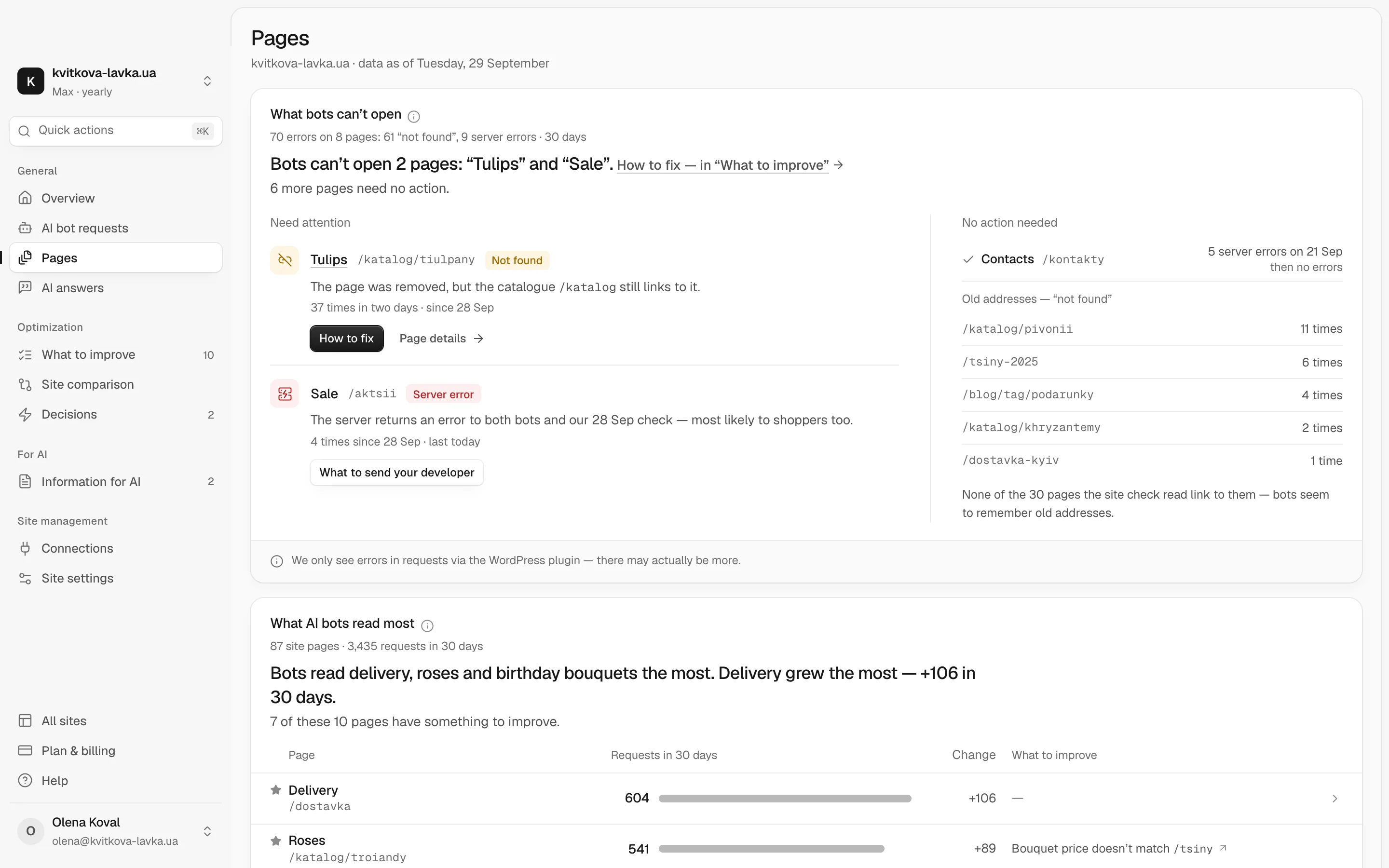
Reading raw logs every week takes time. Pulse does this for you. It shows which AI bots from ChatGPT, Claude, Gemini and others actually visit your site, what they read and where they run into errors. Each problem comes with advice on what to change.
What can't robots.txt do?
Robots.txt is a request, not a lock. RFC 9309 says its rules "are not a form of access authorization". Well-behaved crawlers follow them, but nothing forces them to. In August 2025, Cloudflare reported that Perplexity used undeclared crawlers to get around no-crawl rules. Perplexity disputed this. If you need to keep content private, put it behind a login.
Robots.txt is also only one of several signals you can send to AI systems. Our research on llms.txt and the other AI-crawler signals in 2026 covers llms.txt, meta tags and other options, and explains what each one does.
What should you do this week?
Start with the quickest check. Open yoursite.com/robots.txt in a browser. Find the groups for OAI-SearchBot, Claude-SearchBot and PerplexityBot, then check your CDN's bot settings. In a few minutes you will know whether the bots that build AI answers can reach you at all.
For the whole picture at once, run the free AI check. It shows how AI sees your business and what to do so that it names you, not someone else.
Frequently asked questions
Does blocking GPTBot stop ChatGPT from citing my site?
No. GPTBot collects content that may be used to train OpenAI's models, and OpenAI says each crawler setting is independent. ChatGPT search relies on OAI-SearchBot, so you can disallow GPTBot and still allow OAI-SearchBot. Allowing it makes a citation possible, but it does not guarantee one.
Does ChatGPT-User respect robots.txt?
Not always. OpenAI says robots.txt rules may not apply to ChatGPT-User, because a user starts the request. Perplexity says Perplexity-User generally ignores robots.txt for the same reason. Anthropic says its bots, including Claude-User, honor robots.txt. If these fetchers cannot reach your pages, check your firewall and CDN rules for 403 responses or challenges.
Does blocking Google-Extended remove me from Google AI Overviews?
No. Google-Extended controls whether your content is used for Gemini training and for grounding in Gemini Apps. It does not affect your inclusion or ranking in Google Search. AI Overviews and AI Mode rely on Googlebot and the usual Search controls.
If I block GPTBot or ClaudeBot now, is my old content removed from training data?
Don't count on it. Anthropic's documentation says restricting ClaudeBot excludes your site's future materials from training datasets. Treat a block as a signal for the future, not as a request to delete data that was already collected.
How long does a robots.txt change take to affect ChatGPT search?
OpenAI says its search systems can take about 24 hours to adjust after you update robots.txt. After that, check your server logs to confirm that OAI-SearchBot is getting 200 responses.
Does Cloudflare block AI bots by default?
Cloudflare announced on 1 July 2025 that it blocks known AI crawlers by default for new domains, and that owners can choose to allow them. If AI bots are not reaching your site, check your Cloudflare bot and AI crawler settings and any managed robots.txt.