
To get your products on ChatGPT Shopping, ChatGPT needs two things from you. The first is a merchant product feed: Shopify and Etsy catalogs are reportedly included already, and other stores apply at chatgpt.com/merchants. The second is a set of product pages that OpenAI's crawler and cloud browser can reach and read. After that, your feed, your pages and your checkout need to give the same facts, and nothing in your stack should block agents by accident.
Nobody can guarantee that your products will be shown. That includes OpenAI's partners, tool vendors and Chetver.
What changed in November 2026: ChatGPT Wallet and the Partner Playbook
On 13 November 2026, OpenAI introduced ChatGPT Wallet, built with American Express, Chase, Mastercard and Visa. It works through dots, OpenAI's agents that carry out tasks for a user. At first it is open only to ChatGPT Pro subscribers in the US who are 18 or older and have eligible US-issued cards. OpenAI says agents pay without seeing the user's real card details, and every purchase needs a security check.
TechCrunch reports that the user reviews the items, the total and the card before checkout, then approves with Face ID or a fingerprint. OpenAI calls this a limited launch that lets it test the feature before a wider rollout. FinTech Futures notes that virtual cards are not supported at launch. CNBC reports that, to start, OpenAI takes no cut of Wallet purchases.
For stores, the key detail is where the purchase happens. Wallet runs through the merchant's existing checkout, not inside ChatGPT. According to Relevant Audience's summary of OpenAI's payments guide, no Wallet-specific integration is needed.
This is a change of direction. Instant Checkout launched on 29 September 2025 with Stripe and kept checkout inside ChatGPT. OpenAI moved away from it in March 2026, and a spokesperson said it was "transitioning to apps".
Alongside Wallet, OpenAI published its Partner Playbook for commerce. It lists six steps for merchants:
- Submit product feeds.
- Help ensure cloud browser access.
- Accept payments.
- Build a plugin.
- Integrate Sign in with ChatGPT.
- Claim your business.
This checklist covers the first three, because they decide whether your products can be found and bought today.
How does ChatGPT choose which products to show?
The Partner Playbook says that, depending on the request, ChatGPT uses information from the public web, private API integrations and, for retail, merchant product feeds. In practice, you control two of these inputs: the feed and your pages.
The product feed. A product feed is a structured file that lists your products, prices and stock. OpenAI's commerce docs ask retail sellers to submit one so that ChatGPT can use their catalog for product discovery. The docs also include a reference for the product feed schema.
According to a guide checked against OpenAI's docs on 30 September 2026, feed onboarding is for approved partners, who apply at chatgpt.com/merchants. The guide lists these required fields: item_id, title, description, url, brand, seller_name, image_url, availability and price. It also says you can upload a Google-format feed once OpenAI confirms that format. Other guides add fields such as is_eligible_search, so check the live schema before you build your feed.
Shopify and Etsy. According to a guide checked against OpenAI's docs on 4 November 2026, Shopify and Etsy catalogs are "already integrated" and need no setup for organic visibility. The same source notes that ChatGPT Ads uses a separate product feed in Ads Manager. That feed is for paid placements and does not replace the organic one.
The public web. Many feed guides skip this half. ChatGPT's search crawler and cloud browser read your pages directly. If they cannot reach a page, or if the price only loads through JavaScript, the page tells ChatGPT very little, however good your feed is.
OpenAI's docs explain the inputs. They do not explain how products are ranked against each other. So treat every step below as a way to remove a reason not to show you, not as a lever that guarantees a spot.
How to get products on ChatGPT Shopping: the four-step store checklist
Step 1: Let OpenAI's bots and cloud browser reach your store
OpenAI's Wallet announcement warns that some sites may block agent purchases without meaning to. It asks merchants to make sure agents are not blocked by accident, and that payment and risk systems recognize legitimate agent purchases. TechCrunch notes that some retailers block AI agents on purpose, and it names Amazon as the largest of them. Either choice is valid, but make it on purpose.
robots.txt. OpenAI documents its crawlers and user agents separately. You can control each of them in its own group of rules in robots.txt. The cloud browser is a different case: your CDN or firewall decides whether it gets through, not robots.txt.
| Agent | What it does | Where you control it | What blocking it means for a store |
|---|---|---|---|
OAI-SearchBot | Crawls pages so they can appear in ChatGPT search results | robots.txt, CDN | Your product pages may not appear as results or sources |
ChatGPT-User | Visits pages when a user asks ChatGPT to open or check something | robots.txt (check the current rules), CDN | ChatGPT may fail to open your page when a shopper asks about it |
GPTBot | Collects content for model training | robots.txt | A separate decision about training, controlled apart from search |
| ChatGPT cloud browser (dots and the ChatGPT agent) | Uses your site the way a person does and can go through checkout. Signs certain requests with Web Bot Auth | CDN, firewall, bot manager | Agent purchases through Wallet can fail |
A minimal set of rules that lets search and user visits through looks like this:
User-agent: OAI-SearchBot
Allow: /

User-agent: ChatGPT-User
Allow: /
Make sure that older rules do not override these lines. Look for a template copied from another site, or a rule such as User-agent: * with Disallow: /products/. Our map of llms.txt and the other AI-crawler signals in 2026 explains what each signal controls and what it does not.
CDN, firewall and bot manager. Web Bot Auth lets a bot sign its HTTP requests cryptographically, so your site can check that they really come from ChatGPT. It is based on HTTP Message Signatures (RFC 9421). According to Relevant Audience's summary of OpenAI's agent access guide, the cloud browser can already use websites and does not need to be added to an allowlist. OpenAI asks sites to let signed requests through at the CDN or firewall.
The Keyword reports that Akamai, Cloudflare, HUMAN and Vercel verify these signatures automatically. Even so, review these settings:
- "Block AI bots" or bot-fight switches turned on in your CDN dashboard;
- JavaScript challenges or CAPTCHAs on product, cart and checkout URLs;
- rate limits that treat fast, regular page loads as an attack;
- blocks on countries or data-center IP addresses, which can catch a cloud browser.
Fraud and risk rules at checkout. A shopper can approve a purchase in ChatGPT, and it can still fail at your checkout. According to the same summary, OpenAI's payments guide asks risk systems to read a new Forwarded header, which can carry seven parameters. The guide also says that your business handles the order, fulfillment, customer support and fraud decisions.
Ask your payment provider or fraud tool vendor two questions:
- Does your tool read this header?
- How does it score sessions from headless browsers running in data centers?
Step 2: Make product pages readable without JavaScript
Crawlers do not always run JavaScript. If your price, stock status or shipping cost loads only after the page renders, a bot may see an empty slot.
To check, open a product page with JavaScript turned off in your browser. Or look at the raw HTML with curl -A "OAI-SearchBot" https://yourstore.com/product-url. The plain HTML should contain:
- the product name and the variant (size, color, model);
- the price with its currency, plus the sale price and its end date if a sale applies;
- stock status in words, such as "In stock" or "Ships in 5–7 days";
- the shipping cost and delivery time, or a link to them;
- the returns window and a link to the full policy.
Then add Product JSON-LD with the same values. JSON-LD is a block of structured data in the page code that describes the product in a format machines can read. The schema.org types Product, Offer, OfferShippingDetails and MerchantReturnPolicy cover price, stock, shipping and returns.
For example, imagine a store that sells a coffee grinder for $89 with $5 shipping and 30-day returns. The store and product are made up. Its markup could look like this:
{"@context":"https://schema.org","@type":"Product","name":"Steel Burr Coffee Grinder","sku":"CG-200","brand":{"@type":"Brand","name":"ExampleBrand"},"offers":{"@type":"Offer","price":"89.00","priceCurrency":"USD","availability":"https://schema.org/InStock","url":"https://example.com/grinder-cg-200","shippingDetails":{"@type":"OfferShippingDetails","shippingRate":{"@type":"MonetaryAmount","value":"5.00","currency":"USD"},"shippingDestination":{"@type":"DefinedRegion","addressCountry":"US"}},"hasMerchantReturnPolicy":{"@type":"MerchantReturnPolicy","applicableCountry":"US","returnPolicyCategory":"https://schema.org/MerchantReturnFiniteReturnWindow","merchantReturnDays":30}}}
The most important rule is that the JSON-LD matches what a shopper sees. If the markup says $89 and the page says $69, a bot has two prices and no way to tell which one is right.
Facts that apply to the whole store also belong in one place that is easy to read: delivery zones, return terms, payment methods and contacts. Keep them as plain text on a page, not only inside a pop-up or an image. An AI Page from Chetver is one option for your core business facts, such as prices, contacts and services. Chetver builds the page from your website, and you publish it on your own subdomain (aipage.yoursite.com). It comes with an llms.txt file, a plain-text file that points AI tools to your key pages.
Step 3: Keep the feed and the site in agreement
Your feed and your pages are two descriptions of the same product. When they disagree, ChatGPT may show a wrong price or an item that is out of stock.
This week, a mismatch is especially likely. Black Friday and Cyber Monday prices change fast, and feeds often lag behind the site. Check these points:
- Price. The sale price in the feed, on the page and in the JSON-LD should start and end at the same time.
- Availability. When a variant sells out on the site, the next feed update should mark it out of stock.
- Currency. Use the same currency code everywhere. Do not send USD in the feed while the page shows another currency by default.
- Variant URLs. Each feed item should link to the exact variant, not to a category page or the home page.
- Update frequency. If your feed tool supports more frequent or partial (delta) updates, turn them on before Cyber Monday.
Step 4: Find bot errors on product and checkout pages
A page that works for you can still fail for a bot. Look for these problems:
- 4xx errors. A 403 usually means a firewall or bot rule. A 404 often means feed URLs point to deleted products. A 429 means the bot hit a rate limit.
- 5xx errors and timeouts. These are common under Black Friday load. A bot that gets a timeout leaves without your price or stock status.
- Redirect chains. Look for geo-redirects to a country store, or redirects to a login or cookie page.
- Cookie walls and interstitials. These are overlays that hide the price until someone clicks.
How to check that OpenAI's bots actually reach your products
Your server access logs show what really happened. If you can export them, filter by user agent and count the status codes. This command assumes the standard combined log format, where the status code is the ninth field:
grep -E "OAI-SearchBot|ChatGPT-User" access.log | awk '{print $9}' | sort | uniq -c
A healthy result is mostly 200s, with few 403, 429 or 5xx responses. Then run the same filter on product URLs only, and then on cart and checkout URLs.
Anyone can copy a user-agent string. So compare the requesting IP addresses with the IP ranges that OpenAI publishes for its bots. Finally, ask ChatGPT about one of your products by name, and check whether it opens your page and quotes the right price.
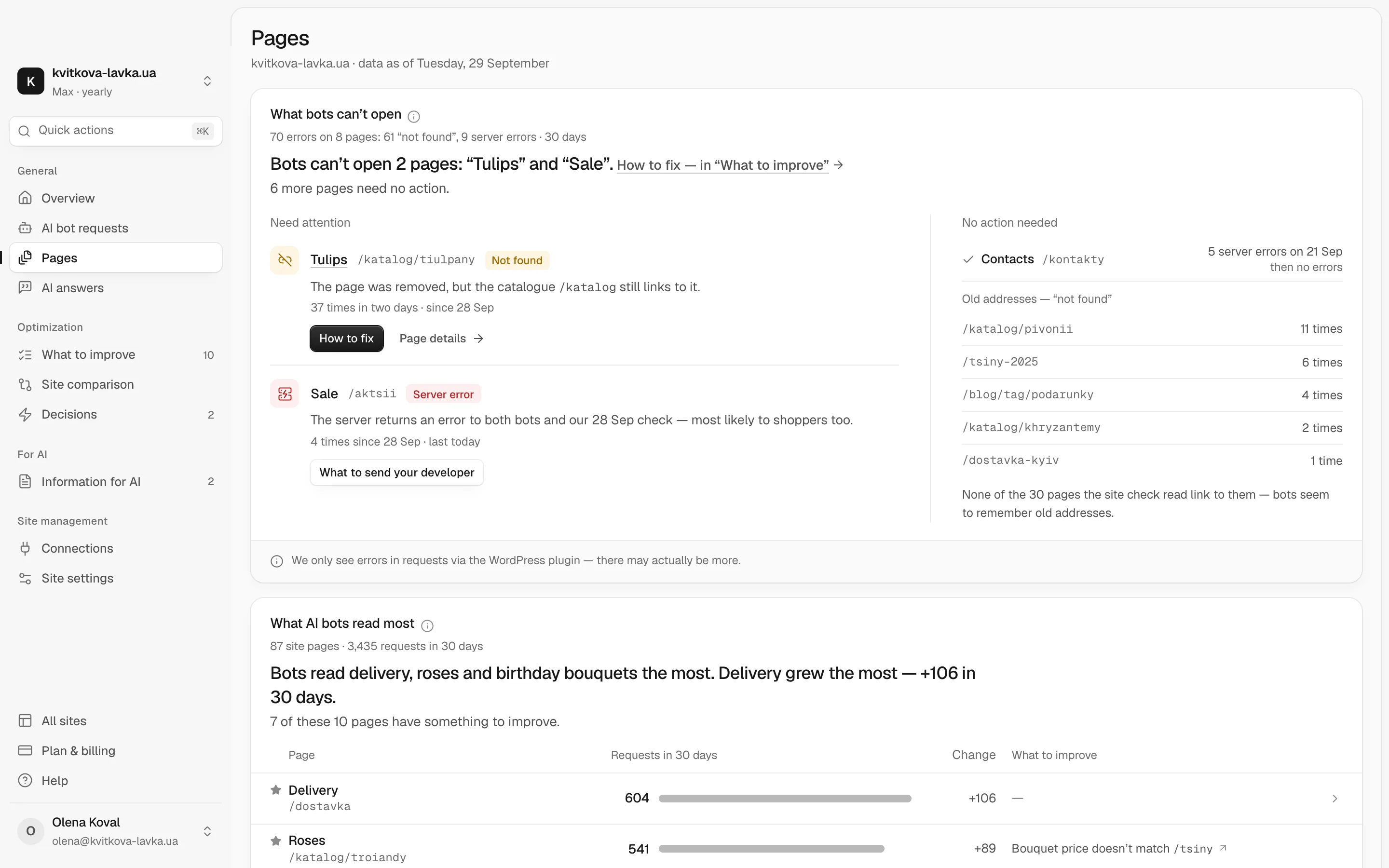
If you would rather not parse logs by hand, Pulse shows which AI bots from ChatGPT, Claude, Gemini and others visit your site, what they read and where they stumble. Every problem comes with advice on what to change. The page-by-page view of bot errors is part of the Pro plan.
What can stores outside the US do now?
For now, Wallet is US-only. According to Veliu's summary of OpenAI's guides, OpenAI plans to expand availability with businesses, banks and payment networks, but has given no dates or countries. The same source says OpenAI is still working out how third-party plugins will work with Wallet. For now, the browser path is the one that is ready.
The discovery side, meaning feeds and pages that bots can read, does not depend on Wallet. Stores in Europe, Ukraine, Kazakhstan and other markets outside the US can do this now:
- Complete steps 1–4. Bot access and readable pages matter wherever your shoppers are.
- Apply for feed onboarding at chatgpt.com/merchants. If you are on Shopify, check what the platform already shares.
- Show prices with explicit currency codes, such as EUR, GBP, UAH or USD, in both the HTML and the JSON-LD.
- State plainly which countries you ship to, how long delivery takes and what it costs.
- Review geo-blocks and fraud rules now. That way, foreign data-center traffic is not rejected by default if agent checkout reaches your market.
For example, imagine a store in Kyiv that sells coffee equipment and ships to the EU. Its prices appear only after a JavaScript currency switcher runs, and its CDN blocks all traffic from outside Europe. ChatGPT's bots can see neither the price nor the shipping terms. ChatGPT may then describe a competitor instead, even though this store's feed is complete.
What nobody can promise about ChatGPT Shopping
Nobody can guarantee organic placement in ChatGPT Shopping. OpenAI documents what goes in, but not how products are ranked, and it describes no way to pay for organic placement. Paid placements run through ChatGPT Ads, which uses a separate feed. Treat any vendor that promises "eligible means shown" with caution.
The rollout has limits too. Wallet is in a gradual launch for US Pro subscribers only, and features can change: Instant Checkout showed that in March 2026. Build on what lasts:
- pages that bots can reach;
- facts that agree across feed and site;
- a checkout that does not reject legitimate agents.
To find out whether ChatGPT mentions your store over time, you need to measure it. Our research on Share of Model and measuring AI visibility explains how.
Printable checklist and your next step
| Check | How to verify | Tool |
|---|---|---|
| robots.txt allows OAI-SearchBot and ChatGPT-User | Open /robots.txt and look for wildcard rules that override them | Browser, robots.txt tester |
| CDN or firewall does not challenge signed ChatGPT requests | Review bot rules and challenge logs for product and checkout URLs | Cloudflare, Akamai, HUMAN or Vercel dashboard |
| Fraud tool reads the Forwarded header | Ask your payment or fraud provider | Email or support ticket |
| Price, stock, shipping and returns are in plain HTML | Turn off JavaScript or run curl on a product page | Browser, curl |
| JSON-LD matches the visible page | Compare price, currency and availability field by field | Structured data validator |
| Feed and site agree | Spot-check 10 sale items after each price change | Feed tool, product pages |
| Few 4xx, 5xx or timeouts for OpenAI bots | Filter access logs by user agent and URL type | Server logs, Pulse |
| Store facts in one readable place | Check that delivery, returns and contacts are visible without logging in | Your site, AI Page, llms.txt |
Your next step this week: pull one day of server logs, filter for OAI-SearchBot and ChatGPT-User on product URLs, and count the responses that are not 200. If that number is high, fix those errors before you change your feed or your copy.
To see how AI assistants describe your store today, run the free AI check.
Frequently asked questions
How do I get my products to show up in ChatGPT Shopping?
Give ChatGPT a merchant product feed and product pages it can read. Shopify and Etsy catalogs are reportedly included already, and other stores apply at chatgpt.com/merchants. Then check that robots.txt lets OAI-SearchBot and ChatGPT-User through. Your CDN or firewall should also let them through, along with signed requests from the ChatGPT cloud browser. Price and stock should appear in plain HTML. These steps make your products eligible to be shown, but nobody can guarantee placement.
Are Shopify and Etsy products included in ChatGPT automatically?
According to a feed guide checked against OpenAI's docs in November 2026, Shopify and Etsy catalogs are already integrated and need no setup for organic visibility. Your product pages still need to be reachable and readable for OpenAI's bots, and prices and stock should match across the catalog and the site.
Can I pay to have my products recommended in ChatGPT Shopping?
OpenAI documents no way to pay for organic placement, and it does not publish how products are ranked. Paid placements run through ChatGPT Ads, which uses a separate product feed in Ads Manager. Be careful with any vendor that promises organic placement.
What is ChatGPT Wallet and who can use it?
ChatGPT Wallet launched on 13 November 2026. It lets OpenAI's dots agents pay for purchases without seeing the user's real card details. At first it is open only to ChatGPT Pro subscribers in the US who are 18 or older and have eligible US-issued cards. The user approves each purchase with a security check, such as Face ID or a fingerprint.
Do I need to integrate anything for ChatGPT agents to buy from my store?
According to reports on OpenAI's payments guide, Wallet works with your existing checkout and needs no Wallet-specific integration. You do need to make sure your CDN or firewall lets signed Web Bot Auth requests through. Your fraud tools should also recognize legitimate agent sessions, for example by reading the new Forwarded header.
Can stores outside the US sell through ChatGPT?
Wallet checkout is US-only for now, and OpenAI has given no dates or countries for expansion. Discovery through feeds and readable pages does not depend on Wallet. Stores elsewhere should make sure bots can reach their product pages, show prices with explicit currency codes and state their shipping terms clearly. They can also apply for feed onboarding now.