
To get cited in Microsoft Copilot, Bing must be able to crawl and index your pages, and those pages must be open to grounding. Grounding is Microsoft's word for using your content as input when an AI answer is written.
In practice this means three things. Let Bingbot reach your key pages. Leave AI Grounding on its default, Allow, even if you opt out of AI training. Keep your prices, hours and contacts in plain HTML that says the same thing everywhere.
Microsoft announced the new training and grounding controls on 30 October 2026. It starts honoring them on 1 February 2027. Microsoft also says clearly that no setting guarantees inclusion in an answer.
How does Copilot choose which sources to cite?
Microsoft separates three uses of your content. In its 30 October 2026 announcement it defines them like this:
- Indexing and ranking means showing your page in regular Bing search results. Microsoft says plainly that this is not grounding.
- AI Grounding means using your content as input to help write an AI answer. Microsoft says grounded content can appear "with links and citations providing a path to the original content". This is how a Copilot citation happens.
- AI Training means using your content to change the learned parameters of a generative AI model. The model learns from your text, but no link comes with it.
The preferences apply to web content that Microsoft's crawlers collect and use for answers in Bing, Copilot and Microsoft 365. They are written as rules for Bingbot. So you start in the same place as with Bing search: if Bingbot can't fetch a page, Microsoft has nothing from that page to ground an answer on.
The announcement does not explain how Microsoft picks which grounded page to cite. You control two things: whether you are eligible (crawled, indexed, open to grounding), and how clearly your pages state the facts a customer asks about. The rest of this guide covers both.
What Microsoft changed on 30 October 2026: AI Training vs AI Grounding
The new preferences replace NoArchive and NoCache. Microsoft introduced those two tags in 2023 as its training and grounding controls. The new controls are separate, so you can say yes to one and no to the other. They are announced but not live yet.
AI Training: one shared robots.txt token, plus page-level rules
To block training for a whole site, Microsoft uses the shared token __usage_ai-training in robots.txt:
User-Agent: __usage_ai-trainingDisallow: /
To block only part of the site, use a path instead, for example Disallow: /example-path/. To set training for a single page, use a meta tag or an HTTP header:
<meta name="Bingbot" content="ai-training:disallow">X-Robots-Tag: Bingbot: ai-training:disallow
A page-level training setting overrides robots.txt. The token comes from an IETF Internet-Draft, draft-kelley-aipref-training-preference-signal. The IETF is the body that writes many internet standards. Microsoft notes that the final standard is still being worked on.
AI Grounding: set per page only, with three values
Grounding has no site-wide robots.txt setting. You set it per page with a meta tag or an X-Robots-Tag header.
| Value | How to set it | What it means |
|---|---|---|
| Allow (default) | Nothing. This applies when no preference is published. | Content can inform AI answers in Microsoft's own products and in grounding services Microsoft provides to others. |
| DisallowExtended | <meta name="Bingbot" content="ai-grounding:disallowextended"> | Grounding only in experiences Microsoft runs, such as AI Mode, AI Overview, Copilot and Microsoft 365. Excludes services Microsoft provides to third parties, such as Web IQ and the grounding API in Foundry. |
| Disallow | <meta name="Bingbot" content="ai-grounding:disallow"> or X-Robots-Tag: Bingbot: ai-grounding:disallow | Content is not used to inform AI-generated answers. |
Key dates
| Date | What happens |
|---|---|
| 15 December 2026 | Temporary grounding preferences open in Bing Webmaster Tools. They are only for sites that use NoArchive or NoCache on that date. |
| 1 February 2027 | Microsoft starts honoring AI Training and AI Grounding preferences as it crawls pages. |
| 1 March 2027 | Deadline. After this date, NoArchive and NoCache are no longer read as training or grounding preferences. |
| 30 September 2027 | The temporary grounding preferences expire. |
If your site uses NoArchive or NoCache
Look for noarchive or nocache in your page source and in your response headers. A plugin, a theme or a server rule can add them without anyone choosing to. Once Microsoft detects the new preferences on a site, it ignores any remaining NoArchive or NoCache.
Pages that use the old tags but have no temporary grounding preference recorded in Bing Webmaster Tools by 1 March 2027 default to Allow for grounding until they are recrawled. Microsoft's New AI Preferences help page explains the transition in more detail.
Which setting keeps you cited in Copilot?
Microsoft gives this exact example: set AI Training to Disallow and AI Grounding to Allow. That keeps your content eligible to inform answers without letting it train models. Because grounding is already Allow by default, this only takes the robots.txt training rule.
| Your goal | AI Training | AI Grounding | Effect on Copilot answers |
|---|---|---|---|
| Be cited as widely as possible | Allow (do nothing) | Allow (do nothing) | Eligible everywhere Microsoft grounds answers |
| Opt out of training, stay citable | Disallow in robots.txt | Allow (do nothing) | Still eligible for citations |
| Stay in Microsoft's products only | Your choice | DisallowExtended | Copilot and Bing AI answers stay possible; third-party grounding is excluded |
| Keep out of AI answers | Your choice | Disallow | Not used to inform AI answers |
DisallowExtended has a cost. PPC Land summarizes it as a way to stay in Copilot answers while keeping your pages out of the grounding Microsoft sells to others. But Microsoft warns that both DisallowExtended and Disallow "will significantly reduce your content's visibility in AI-generated experiences".
For most small businesses that want customers to find them, we recommend leaving grounding on Allow. Decide on training as a separate question.
How to get cited in Copilot: a 5-step checklist
- Make sure Bingbot can crawl and index your key pages.
- Set your training and grounding preferences on purpose.
- Put your business facts in plain HTML that matches your profiles.
- Ask Copilot 5–10 real customer questions and log the sources it cites.
- Watch Bingbot requests and errors in your server logs.
Step 1: Make sure Bingbot can crawl and index your key pages
List the pages customers need: home, services, pricing, locations, contacts and your main product or category pages. Then check each of them:
- Open robots.txt and look for any
Disallowrule that applies to Bingbot or to all user agents and covers these pages. - In Bing Webmaster Tools, use URL Inspection on each key page to confirm Bing can fetch and index it.
- Check the pages for
noindextags and for redirects that end on the wrong URL.
The Allow setting does not undo a crawl block. Microsoft says the preferences control how content is used, not whether it can be crawled. A robots.txt rule that blocks Bingbot still wins.
When you change a page, you can send an IndexNow ping. IndexNow is a protocol for telling search engines that a URL has changed. Microsoft says it raises the chance of a recrawl but does not guarantee a date.
Step 2: Set your training and grounding preferences on purpose
Decide on training first. If you opt out, add the __usage_ai-training group shown above to robots.txt. Leave grounding alone if you want Copilot citations. Add ai-grounding:disallow or ai-grounding:disallowextended only to pages you really want kept out, such as members-only material.
Publishing a preference is not the same as activating it. Microsoft has to recrawl a page before it sees the change, and it only starts honoring the preferences on 1 February 2027. Remove any NoArchive or NoCache tags you no longer want before 1 March 2027.
Step 3: Put prices, hours, contacts and services in plain HTML
If an assistant can't read a fact, it can't quote it. Microsoft's announcement does not cover how its crawlers handle JavaScript, so the safe choice is to put key facts in the server's HTML response. Turn JavaScript off in your browser, or open "view source", and check that you can still see:
- prices or price ranges, with currency;
- opening hours, including holiday changes;
- address, phone number and email;
- a list of services or products in plain words, not only in images or sliders.
Then compare these facts with your Bing Places listing, your Google Business Profile and your social profiles. If the facts conflict, an answer may quote the wrong version, or none at all.
Some businesses also keep all their facts on one dedicated page. Chetver's AI Page builds this page from your website. It lists prices, hours, contacts and services in one crawlable place, and you publish it on aipage.yoursite.com together with an llms.txt file. Which AI crawlers read llms.txt, and how it fits with robots.txt and the new tokens, is covered in our map of AI-crawler signals in 2026.
Step 4: Ask Copilot real customer questions and log the cited sources
Write 5–10 questions the way customers actually ask them. Run each one in Copilot and record what it cites. Repeat this every month, because answers change.
For example, imagine a dental clinic in Leeds. Its log might look like this:
| Question | Clinic cited? | Which URL | Other sources cited |
|---|---|---|---|
| Emergency dentist open on Sunday in Leeds | No | — | Two directories, one competitor |
| How much does teeth whitening cost in Leeds? | Yes | /prices | A comparison site |
| Does [clinic name] accept new patients? | Yes | /contact | Bing Places listing |
Rows marked "No" show you where the work is. Often the page that would answer the question doesn't exist, or the fact is hidden.
Bing Webmaster Tools also has an AI Performance report. According to PPC Land, it has been available since February 2026. According to Search Engine Roundtable, it shows citations, cited URLs and grounding queries across supported AI experiences. Use it next to your manual log: the report shows the scale, and the log shows the context.
Step 5: Watch Bingbot requests and errors in your server logs
In your server access logs, filter requests by the Bingbot user agent and check:
- which of your key pages Bingbot requests, and how often;
- status codes: 4xx and 5xx errors, redirect chains, or 403 responses from a firewall or bot protection;
- slow responses on pages that hold your facts;
- whether Bingbot comes back after you change a page or send an IndexNow ping.
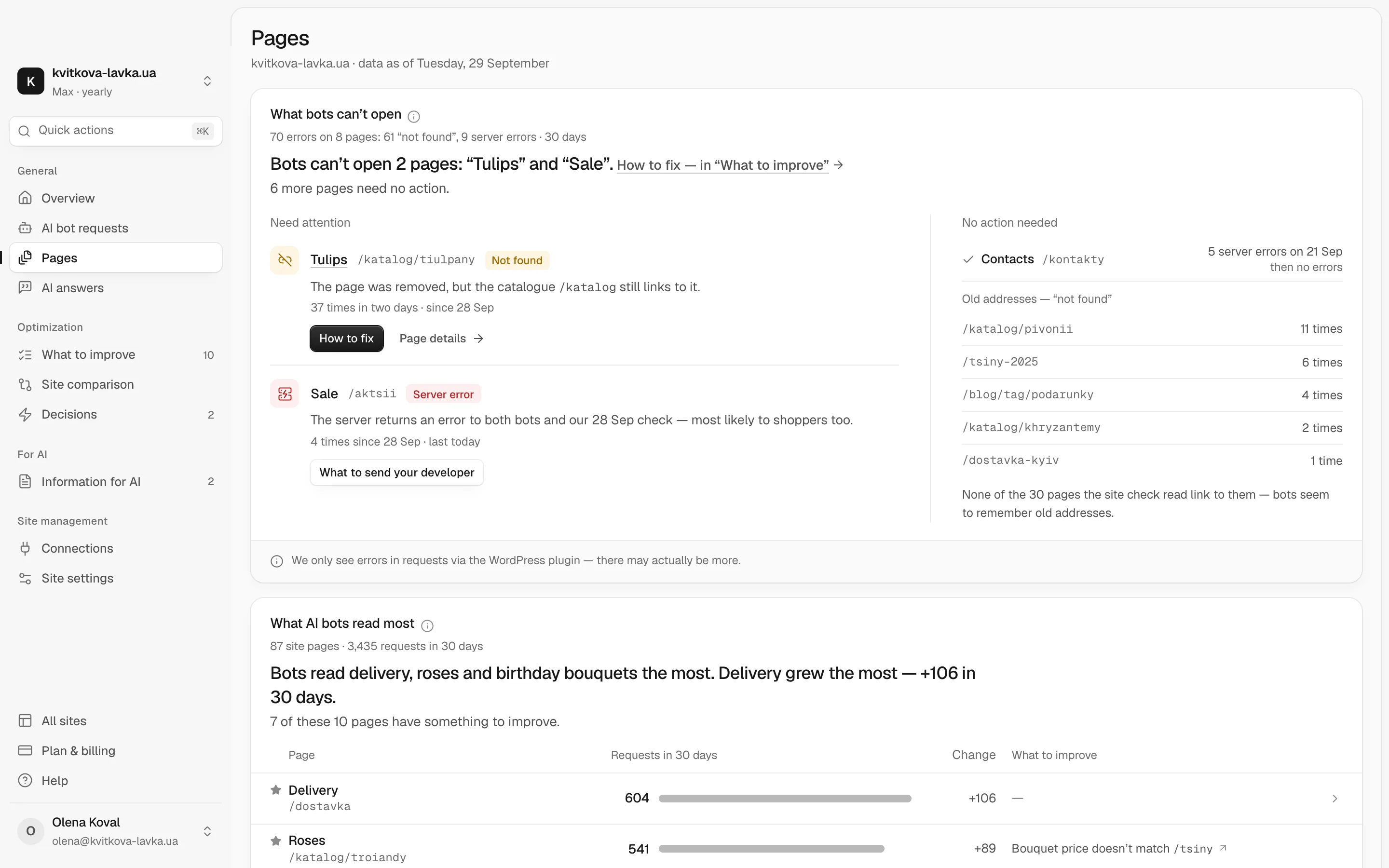
If reading raw logs isn't practical for you, Chetver's Pulse shows which AI bots visit your site, what they read and where they run into errors. Each problem comes with advice on what to change. Microsoft Clarity has also added Agentic Analytics, which according to MarketingProfs tracks which AI agents visit a site and what tasks they complete.
How Bing's controls compare with Google, OpenAI and Anthropic
The training token is shared across the industry. Dataconomy reports that Google, Microsoft, OpenAI and Anthropic said they will honor __usage_ai-training. The timing is different for each:
| Provider | Honors __usage_ai-training | Separate grounding preference announced |
|---|---|---|
| Anthropic | Has begun implementing it | None in the coverage we reviewed |
| OpenAI | Planned "in the coming months" | None in the coverage we reviewed |
| Microsoft | From 1 February 2027 | Yes: Allow, DisallowExtended, Disallow |
| Targeting 2027 | None in the coverage we reviewed |
Dataconomy also notes that the IETF tracker lists the token as an individual draft with no formal standing. Of the four, Microsoft is the only one that has published a named, separate grounding preference in the sources we reviewed. For every other signal you can send to AI crawlers, see the llms.txt directive map.
Why this matters now: OpenAI says ChatGPT search volume equals about 20% of Google's, as reported by MarketingProfs. That figure comes with caveats. OpenAI counts only ChatGPT requests that trigger a web search, and it did not say where its Google comparison comes from. Still, AI assistants are now a discovery channel you should check one by one, and Copilot is one of them.
What these controls don't do
- They don't control crawling. They govern how content is used. Crawl access is still set in robots.txt.
- They don't guarantee anything. Microsoft says neither choice guarantees inclusion, traffic or payment.
- They don't undo the past. Dataconomy notes that the training opt-out can't reverse data that has already been collected.
- They don't change Bing search. Eligibility for regular Bing results stays the same. The current Bing search syndication API, which returns links for regular search, is not affected by the grounding preference.
- They don't work until a recrawl. A preference you publish today has no effect until Bing fetches the page again, and Microsoft starts honoring preferences on 1 February 2027.
What to do this week
Getting cited in Copilot starts with eligibility. Make sure Bingbot can crawl your key pages, keep grounding on Allow, and decide on training separately. Then make your facts easy to quote.
Your next step: search your site's HTML and headers for noarchive, nocache and any Bingbot blocks. Before 1 March 2027, fix anything you didn't add on purpose. After that, run your 5–10 customer questions in Copilot and save the log as a baseline to compare against next month.
Frequently asked questions
If I block AI training, will I disappear from Copilot answers?
No. AI Training and AI Grounding are separate preferences. Microsoft's own example is Training set to Disallow and Grounding set to Allow, which keeps your content eligible to inform Copilot answers. Blocking training also doesn't change your eligibility for regular Bing search results.
Can I set the Bing grounding preference in robots.txt?
No. Microsoft offers no site-wide robots.txt setting for grounding. You set it per page with a meta tag such as <meta name="Bingbot" content="ai-grounding:disallow"> or with an X-Robots-Tag header. Only the training preference can be set in robots.txt, using the __usage_ai-training token.
When do Bing's new AI Training and AI Grounding preferences take effect?
Microsoft starts honoring them on 1 February 2027, as it crawls each page. Temporary grounding preferences open in Bing Webmaster Tools on 15 December 2026, for sites that use NoArchive or NoCache. After 1 March 2027, NoArchive and NoCache are no longer read as AI preferences.
What does DisallowExtended mean for grounding?
DisallowExtended limits grounding to experiences Microsoft runs, such as AI Mode, AI Overview, Copilot and Microsoft 365. It excludes grounding services Microsoft provides to third parties, such as Web IQ and the grounding API in Foundry. Microsoft warns that it significantly reduces visibility in AI-generated experiences.
How can I see how often Copilot cites my site?
Bing Webmaster Tools has an AI Performance report, available since February 2026. It shows citations, cited URLs and grounding queries across supported AI experiences. Use it together with a manual log of real customer questions you ask Copilot each month.